Tag: Visual Programming

  • Beauty in Construct: Preliminary Look at the Divooka Language Specification

    Beauty in Construct: Preliminary Look at the Divooka Language Specification

    Overview

    Divooka is a cutting-edge visual programming platform developed by Methodox Technologies, Inc. It enables users to build and deploy complex applications through a drag-and-drop, node-based interface that integrates seamlessly with C# libraries.

    Key Features

    • General-Purpose & Flexible: Suitable for a wide range of use cases – from business tools to innovative software products – supporting both automation and application development.
    • Node-Based Visual Interface: Workflows are constructed visually by connecting nodes that represent data operations, logic, APIs, and more.
    • Multiple Distributions:
      • Divooka Explore: A beginner-friendly, Windows-only edition designed for learning, data analytics, dashboards, programming, and everyday utilities.
      • Divooka Compute: A professional package built on the same engine, aimed at power users.
    • Cross-Platform Support: While early versions support Windows, full Linux and macOS support is planned.
    • Strong Architectural Foundations: Based on Data-Driven Design principles, Divooka emphasizes modular, external control of behavior through data files – streamlining workflows without modifying code.
    • Active Development & Community: Ongoing updates, documentation (wiki), tutorials, a Discord community, and blog posts ensure an active ecosystem.

    Divooka is built around node graphs as executable documents. Instead of writing sequential code, developers construct graphs of nodes, where each node represents a unit of computation or data. This graph-based approach supports both dataflow-oriented and procedural-oriented paradigms.

    A Divooka script file (a “Divooka Document”) acts as a container for node graphs.

    At its simplest:

    1. A Divooka document contains multiple graphs.
    2. Each graph contains multiple nodes.
    3. Nodes have a type, an optional ID, and attributes.
    4. Node attributes can connect to other nodes’ attributes.

    In a Dataflow Context, node connections are acyclic; in a Procedural Context, connections may be cyclic and more flexible.

    Interpretation
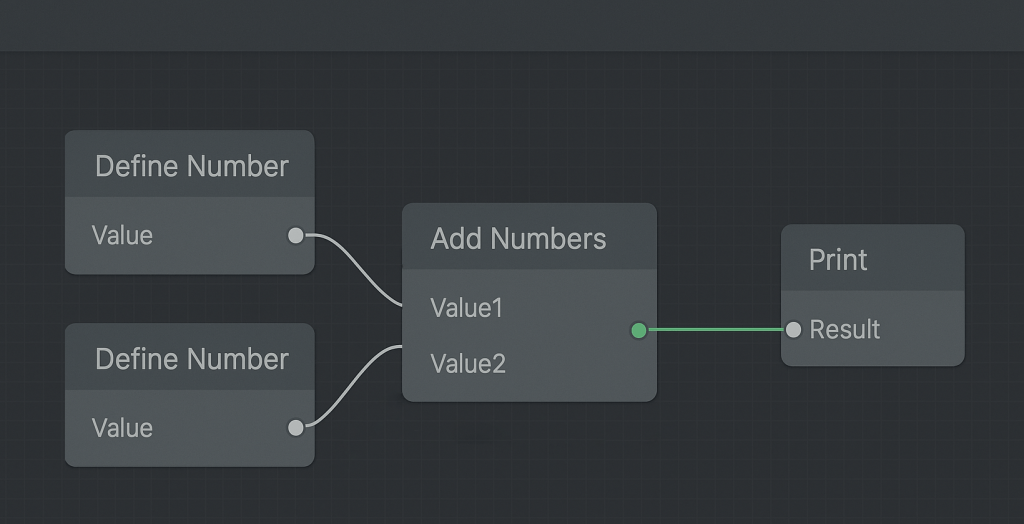
    Simple Divooka Program Diagram
    Simple Divooka Program

    To illustrate the simplicity of the language, we can write a minimal interpreter in Python.

    This interpreter handles an acyclic graph of nodes with TypeID, attributes (all strings), and connections between attributes. Connections are represented directly as attribute values: if an attribute value starts with @, it refers to another node’s attribute (e.g., @Node1.Value).

    For example:

    • DefineNumber outputs a number in its Value attribute.
    • AddNumbers takes two numbers as inputs and produces a Result.
    • Print consumes the Result and prints it.

    The interpreter maps node types to operators, executes them, and produces results.

    # minimal_graph_interpreter.py
    # A tiny, in-memory, non-cyclic node graph + interpreter.
    # Nodes have: Type, ID, attrs (all strings). Connections are '@NodeID.Attr'.
    
    from typing import Dict, Any, List, Callable, Optional, Tuple
    
    Node = Dict[str, Any]  # {"ID": str, "Type": str, "attrs": {str:str}, "state": {str:Any}}
    
    def is_ref(value: Any) -> bool:
        return isinstance(value, str) and value.startswith("@") and "." in value[1:]
    
    def parse_ref(ref: str) -> Tuple[str, str]:
        # "@NodeID.Attr" -> ("NodeID", "Attr")
        target = ref[1:]
        node_id, attr = target.split(".", 1)
        return node_id, attr
    
    def to_number(s: Any) -> Optional[float]:
        if isinstance(s, (int, float)):
            return float(s)
        if not isinstance(s, str):
            return None
        try:
            return float(int(s))
        except ValueError:
            try:
                return float(s)
            except ValueError:
                return None
    
    class Interpreter:
        def __init__(self, nodes: List[Node]):
            # normalize nodes and build index
            self.nodes: List[Node] = []
            self.by_id: Dict[str, Node] = {}
            for n in nodes:
                node = {"ID": n["ID"], "Type": n["Type"], "attrs": dict(n.get("attrs", {})), "state": {}}
                self.nodes.append(node)
                self.by_id[node["ID"]] = node
    
            # map Type -> evaluator
            self.ops: Dict[str, Callable[[Node], bool]] = {
                "DefineNumber": self.op_define_number,
                "AddNumbers": self.op_add_numbers,
                "Print": self.op_print,
            }
    
        # ---- helpers ----
        def get_attr_value(self, node_id: str, attr: str) -> Any:
            """Return the most 'evaluated' value for an attribute (state overrides attrs)."""
            node = self.by_id.get(node_id)
            if not node:
                return None
            if attr in node["state"]:
                return node["state"][attr]
            return node["attrs"].get(attr)
    
        def resolve(self, raw: Any) -> Any:
            """Dereference '@Node.Attr' chains once (graph is acyclic so one hop is enough)."""
            if is_ref(raw):
                nid, a = parse_ref(raw)
                return self.get_attr_value(nid, a)
            return raw
    
        def all_resolved(self, values: List[Any]) -> bool:
            return all(not is_ref(v) and v is not None for v in values)
    
        # ---- operators ----
        def op_define_number(self, node: Node) -> bool:
            # Input: attrs["Value"] (string number). Output: state["Value"] (numeric)
            if "Value" in node["state"]:
                return False  # already done
            raw = node["attrs"].get("Value")
            val = self.resolve(raw)
            num = to_number(val)
            if num is None:
                return False  # can't parse yet
            node["state"]["Value"] = num
            return True
    
        def op_add_numbers(self, node: Node) -> bool:
            # Inputs: attrs["Value1"], attrs["Value2"] (can be @ refs). Output: state["Result"]
            if "Result" in node["state"]:
                return False
            v1 = to_number(self.resolve(node["attrs"].get("Value1")))
            v2 = to_number(self.resolve(node["attrs"].get("Value2")))
            if v1 is None or v2 is None:
                return False
            node["state"]["Result"] = v1 + v2
            return True
    
        def op_print(self, node: Node) -> bool:
            # Input: attrs["Result"] (@ ref). Side effect: print once. Also store state["Printed"]=True
            if node["state"].get("Printed"):
                return False
            r = self.resolve(node["attrs"].get("Result"))
            # Allow printing numbers or strings once the reference resolves
            if r is None or is_ref(r):
                return False
            print(r)
            node["state"]["Printed"] = True
            return True
    
        # ---- execution ----
        def step(self) -> bool:
            """Try to make progress by evaluating any node whose inputs are ready."""
            progressed = False
            for node in self.nodes:
                op = self.ops.get(node["Type"])
                if not op:
                    # Unknown node type: ignore
                    continue
                progressed = op(node) or progressed
            return progressed
    
        def run(self, max_iters: int = 100):
            """Iteratively evaluate until no changes (DAG assumed, so this stabilizes quickly)."""
            for _ in range(max_iters):
                if not self.step():
                    return
            raise RuntimeError("Exceeded max iterations (graph might be cyclic or ill-formed).")
    
    
    if __name__ == "__main__":
        # --- Example in-memory graph ---
        graph = [
            {"ID": "Node1", "Type": "DefineNumber", "attrs": {"Value": "3"}},
            {"ID": "Node2", "Type": "DefineNumber", "attrs": {"Value": "5"}},
            {
                "ID": "Adder",
                "Type": "AddNumbers",
                "attrs": {"Value1": "@Node1.Value", "Value2": "@Node2.Value"},
            },
            {"ID": "Printer", "Type": "Print", "attrs": {"Result": "@Adder.Result"}},
        ]
    
        interp = Interpreter(graph)
        interp.run()   # Should print: 8.0
    

    Running the example graph prints:

    8.0

    Summary

    The Divooka language demonstrates how a minimalist graph-based specification can serve as a foundation for both computation and orchestration.

    Key takeaways:

    • Node-Centric Abstraction: Everything is reduced to nodes with types, IDs, and attributes – uniform, extensible, and easy to interpret.
    • Simple Reference Mechanism: The @NodeID.Attr convention provides a straightforward but powerful way to connect attributes.
    • Separation of Concerns: Distinguishing between dataflow (acyclic, deterministic) and procedural (control flow, cyclic) contexts allows Divooka to cover both declarative and imperative styles.
    • Composable Operators: Even with just three operators (DefineNumberAddNumbersPrint), meaningful behaviors emerge.
    • Compact Interpreter Footprint: The entire interpreter is under 200 lines of Python, demonstrating the specification’s simplicity and rapid prototyping potential.

    One might ask why not use traditional graph connections. The answer is simplicity: defining connections as local attribute references reduces structure while keeping graphs clean. In dataflow, inputs typically come from a single source, while in procedural contexts, outputs are unique but inputs may be shared, so we can just reverse the syntax – making this lightweight approach intuitive and efficient.

    Reference

  • The Divooka Way – Part 1: Philosophically, How Exactly is Divooka Different and Useful Compared to Plain Good Code API

    Written by: Charles Zhang
    Tags: Visual Programming, Developer Tools, API Design, Software Architecture, Programming Paradigms, NVI, No-Code / Low-Code, Programming Philosophy, Tool Economy
    Target Audience: Software Architects, Engine and Tool Developers, Programming Educators and Curriculum Designers, Low-Code/No-Code Platform Researchers, Senior Developers interested in alternative programming models, Developers interested in visual alternatives to traditional code

    This Part 1 focuses on raw API usage. A Part 2 will follow on Morpheus and its derivatives. This article offers high-level analysis and is not intended for beginners.

    Abstract

    Traditional programming uses text to represent program logic. Existing visual design platforms offer varying levels of programmability but generally focus on building specific kinds of applications. From a production-use perspective, Divooka represents a significant step forward in how users build and interact with software – by combining tool-building, data handling, and program logic under a single, coherent interface. This unified approach aims to deliver a substantial productivity boost.

    Overview

    If we already have a really good library – just as we have high-quality commercial software – does it still matter what language or environment we use?

    In theory, it shouldn’t. In practice, it absolutely does.

    Pretty much everything imaginable already exists for C++, often under GNU licenses. But that doesn’t mean a Python, C#, or Java developer can easily access or use those resources. Even when libraries are available for a target language, usage may not be straightforward. Licensing, API design, and documentation all come into play.

    Still, let’s imagine we have a well-written, freely accessible, multi-language-bound, well-documented, and easy-to-use library. Does it then matter how we use it?

    That leads us to the core question:

    If we already have a really good API, why not just use it in C#, Python, C++, Lua, or Pure?

    The Proof of Concept

    To explore this, we can approach the question from three distinct perspectives:

    1. The end user
    2. The program designer
    3. Everyday tool development and sharing

    From the end user’s perspective, assuming the final deliverable is a polished CLI or GUI tool, it typically doesn’t matter what language was used – as long as the interface is well-designed. Case closed.

    From the program designer’s perspective, building anything sophisticated involves significant “dry” work – debugging, iteration, architectural decisions. Productivity depends largely on the quality of the debugger and IDE, and again, it’s not strictly tied to the programming language.

    But from the perspective of everyday tool use, the question becomes more subtle. What do we mean by “everyday tools”? Broadly speaking, we mean:

    1. Tools built quickly to solve practical problems within days
    2. Tools that are easy to share and use by others
    3. Tools that are easy to iterate, improve, refactor, and eventually package as full software
    4. Tools that are maintainable – so that months later, we can return and still understand what we were doing, without extensive documentation effort

    To solve (1), you need extensive libraries.
    To solve (2), you need solid dependency and packaging mechanisms.
    To solve (3), you need simple syntax and easy refactoring.
    To solve (4), you need expressive, self-documenting code – or better yet, self-explanatory program design.

    It’s in this third category – everyday tools – that Divooka stands out. The features baked into Divooka’s graph editor enable rapid development without sacrificing performance or scalability. The editor itself proves how smoothly things can run with minimal setup: just open a graph document, and it works.

    The NVI

    In Divooka, the primary mode of interaction is the Node Visual Interface (NVI) – distinct from both CLI and GUI paradigms.

    Each node represents a functional unit, and the connections represent program or data flow. Unlike CLI, NVI offers “autocomplete” visually – everything is made explicit through connection and layout. Unlike a GUI, an NVI is composed entirely of nodes and avoids complex syntax structures.

    At the base is a node canvas, and programs are built using what we call node-driven design – a pattern that breaks software into node blocks, each representing a compositional or procedural component.

    The main disadvantage of NVI compared to text-based programming is space inefficiency: nodes occupy screen real estate, reducing information density. But this is offset by improved readability: the visual layout shows the exact dependencies between functional units – something much harder to grasp in linear text code.

    NVI becomes more powerful when it supports:

    1. Subgraphs – Logical groups of nodes encapsulated into single blocks. This is more compact than plain functions or classes and more intuitive than managing multiple files.
    2. Extensible node visuals – Nodes can be customized for specific data. For example, a Table node can offer compact entry for 2D data, reducing friction.

    The Scripting Interface

    At its core, the NVI exposes functionality in two ways:

    1. Nodes represent standalone functional units in a Divooka document.
    2. A framework parses the interconnected nodes and derives behavior from the graph structure.

    The key is interface availability – file operations, media I/O, math routines, etc.

    The first use case is covered well by scripting languages like Python, Lua, or Jupyter.
    The second – interpreting a structured node graph into dynamic program behavior – is where traditional languages fall short, often requiring large, specialized frameworks (e.g., Streamlit for Python).

    With Divooka, the same graphical program often needs no changes at all. A simple toggle in the host environment can completely redefine how the program behaves.

    Frameworks like Glaze, Novella, Ol’ista, Slide Present, and App Builder (all part of Divooka Explore except App Builder) rely heavily on metadata – information not defined on the graph, but embedded in the document and interpreted by the host system.

    This separation – code in the graph, behavior defined by metadata – creates a powerful, data-driven model that enables reuse, variation, and flexibility.

    On the Matter of Libraries

    Not all useful features are readily available via libraries. And even when they are, compatibility issues, licenses, platform differences, and interoperability challenges often make reuse hard or impossible.

    At Methodox, we actively author and maintain a curated library set – toolboxes optimized for Divooka. This represents a major investment, ensuring that as Divooka grows, users have an expanding, well-integrated set of native components tailored for node-driven environments.

    Summary

    From a scripting standpoint, Divooka may appear unremarkable: libraries are still authored in native code, and Divooka simply provides an interface layer.

    But methodologically, Divooka offers a profound shift in how we build and interact with programs. It’s as different as using a natural-language model to co-write your software.

    Divooka is a high-level, GUI-native, NVI-first programming system. Our belief is that this new format can significantly enhance productivity, readability, and maintainability by making programs smaller, clearer, less error-prone, and more intuitive.

  • One-Year Anniversary Reflection on The Development of Divooka

    Original Date: July 5, 2025
    Written By: Charles Zhang

    Methodox Technologies, Inc. – officially registered in Ontario at the end of July last year – has now been around for nearly a full year. Time has passed neither too quickly nor too slowly, moving along steadily as it always has. The biggest difference between running a company and doing personal side projects, in my view, can be captured with a comparison between passion and professionalism: when you do something out of passion, you choose based on interest; when you do something professionally, you commit regardless of mood or preference, working methodically toward clear goals and standards – day or night, rain or shine.

    To put it more concretely, the difference lies in quality control. As someone with an engineering background, I’m not particularly gifted at self-promotion. What I can do – and do most naturally – is focusing on making a good product. Some friends have asked where the motivation comes from. Truthfully, I’m not entirely sure either. But like clockwork, I still wake up at 6:30 a.m. every day, ready to work.

    When I first started working on Divooka, I didn’t envision it as a fully-fledged programming language. I wanted it to be general-purpose, yes – but not necessarily from the standpoint of a programming language. The goal was more about decoupling the functionality from its environment, enabling it to run directly from the command line, and making the library design flexible enough to work beyond our immediate domain.

    Initially, the biggest problem I wanted to tackle was how to replace Excel. There are many ways to go about that – because Excel’s greatest strength is also its weakness: it’s too powerful and flexible, which means it often lacks structure. And that chaos is what we wanted to bring order to. The first step was to build something on top of the spreadsheet concept – adding structure and rules, using something like object-oriented thinking to enable users to visually edit and link spreadsheet data.

    Had we stayed on that path, the Divooka interface today would probably look more like floating spreadsheet windows – similar to Apple’s Numbers – instead of the visual node-based editor you see now.

    Back in 2019, I had already started exploring the idea of using general-purpose programming for GUI building. My approach then was more framework-oriented: tools that could generate UI wrappers based on flowcharts. These weren’t new languages, but auxiliary features to make diagrams more reusable.

    In early 2024, we also explored two major directions: graphic annotation and online collaboration, inspired by modern design tools like Figma and Google’s cloud-based productivity suite.

    The ability to build complete applications wasn’t something I initially envisioned – it seemed too ambitious for what started as a personal side project. But going full-time removed that ceiling. It gave us room to think bigger.

    One of the most natural and promising directions for Divooka is visual app development. Unlike traditional text-based languages, Divooka was built as a graphical, extensible environment from the start. Its own development environment is a Divooka app – one that is, in principle, programmable with Divooka itself. That vision is still in blueprint form, and full realization will take time.

    From a business perspective, the experience of leading a team from late 2024 into early 2025 has been mixed. On the plus side, offloading certain tasks helped reduce some pressure. On the downside, with our current financial constraints, it’s been hard to find help we can fully rely on – which, perhaps, is just reality.

    Teamwork through outsourcing introduced its own challenges. Choosing the right people is tough. Even highly capable partners don’t always deliver the expected results. Interestingly, ChatGPT and other large language models played a strange but useful role in this phase – mainly by helping with research and code scaffolding.

    There’s a pattern I’ve noticed: even when working with contractors, I end up defining the architecture and interfaces, and much of my time still goes into coordination. Once you’re past the prototyping phase, iterations are limited, and results vary. In a similar way, large language models tend to produce “one-shot” outputs – either useful or not. But if I’ve already built the structure, the autocomplete results I get from an LLM often rival what a junior outsourced developer might provide.

    In that sense, I’d much rather work closely with people over time – collaborating, communicating, and refining a shared workflow. That’s where real teamwork becomes meaningful.

    Early on, development followed a pretty rigid schedule – when it was just me, with no meetings or other obligations, daily goals were clear and straightforward. But by mid-year, things were shifting constantly. On the one hand, that brought flexibility, and led to a number of unexpected developments, especially in product direction. On the other hand, such reactive planning made it harder to estimate timelines. A case in point: our “first full version,” originally scheduled for release this February, will likely be delayed until next year.

    But as mentioned earlier, even the definition of what qualifies as a “first full version” has evolved dramatically.

    In many ways, my approach to this company mirrors how I ran projects in university. First, I’m still the main driver and implementer. Second, I remain cautious when it comes to collaboration. Over the years, I’ve come to understand the Economy of Scale in a deeply personal way – not in terms of wealth or headcount, but in how accumulated skills and better tools dramatically boost my individual productivity. In this age of AI, that effect is more visible than ever. Contrary to popular belief, knowledge – not just capital – is the primary engine of productivity.

    That said, if you do have capital and a great team, collaborative scale can still achieve amazing things.

    One of the more surprising (though perhaps not shocking) aspects of this journey has been the mix of encouragement and skepticism I’ve received. Support has mostly come from peers in the professional world, while more traditional voices – old friends from university, family members – have tended to be more doubtful. Though, of course, there have been exceptions in both camps.

    This kind of reaction isn’t often talked about on social media, but I think it’s worth reflecting on.

    First, people naturally fear what they don’t understand. Second, those closest to us – friends, family – end up becoming supporters in one way or another, whether they intend to or not. Third, when it comes to values and personal incentives, people respond differently to attempts to break convention – especially where money is involved.

    At a few conferences, I’ve had the chance to talk with other founders. Their motivations, strategies, and philosophies run the full spectrum. Some of the most frustrating folks are those who throw around the term “AI” without substance. (We too fell into that trap at one point, admittedly.) But these experiences – moments of confusion, attempts to find clarity – have opened up my view of the world far more than reading philosophy books or binge-watching TV shows ever did.

    Looking ahead, I see three key challenges:

    1. Finishing development and releasing the first full version of the software.
    2. Creating a complete educational system around it, ensuring product coherence and knowledge accessibility.
    3. Marketing and forming partnerships, while keeping the company sustainable.

    2026 will be a demanding year. We’ll need to maintain development speed while trimming back unnecessary administrative tasks. We want to move with precision, but not become overly cautious. The path forward requires boldness, care, grounded execution, and avoiding the lure of shortcuts. That’s something I need to keep reminding myself.

  • A General Service Configuration Scheme in Graphical Context

    Tags: Design, Visual Programming, Design Language, Configuration, Research
    Author: Charles Zhang
    Publication Date: 2025-05-13
    Target Audience: General User, Visual Programming Language Researcher
    Keywords: GUI, Good Design

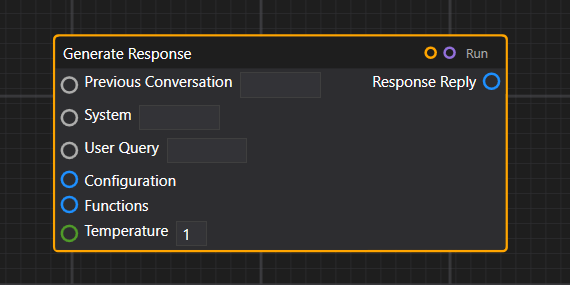
    In this article, we take a look at one emerging pattern that provides a straightforward and compact way to configure services. Generally speaking, when a function expects many inputs, the most straightforward way is to directly expose those on the node. However, this quickly makes the node gigantic in size.

    Node with many parameters

    (Node with many parameters)

    Example in ComfyUI

    (Example in ComfyUI)

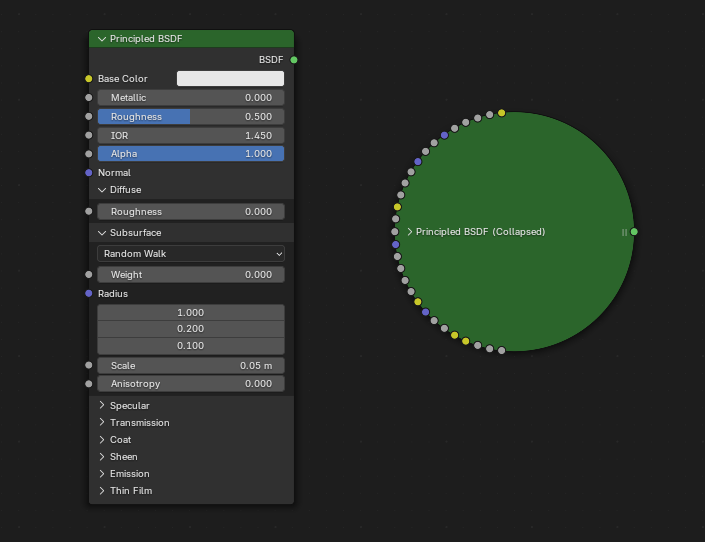
    When a node has too many parameters, it becomes bulky.

    Example in Blender

    (Example in Blender)

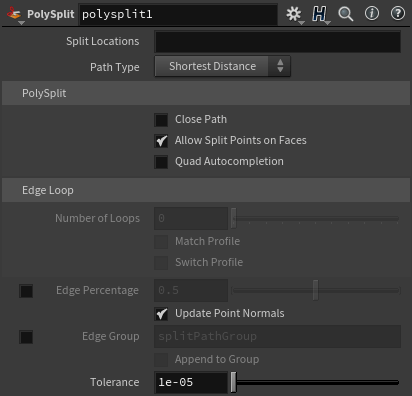
    This quickly becomes infeasible when even more complex parameters are required for the functioning of nodes—for instance, if it’s an online service with many potential configuration settings. A typical approach is thus to utilize a GUI element, which we shall call a “node properties panel.” Below is a sophisticated example from Houdini. PowerBI and Zapier do similar things.

    Houdini node configuration panel

    (Houdini node configuration panel)

    This method falls short for two reasons:

    1. It’s not explicit, and configuration parameters are not visible on the graph. Which makes it not possible to see dataflow nor to programmatically drive those values.

    2. It requires a dedicated GUI and can only be configured within that GUI.

    Usually, some kind of scripting or expression language is used to address the first problem. For instance, in Houdini, users often write VEX snippets or Python expressions inside parameter fields to control behavior dynamically. In Zapier, configuration can include custom JavaScript code or formulas in input fields to manipulate data between steps. These workarounds bring back some level of flexibility, but at the cost of breaking the visual flow and requiring users to write code inside otherwise “no-code” or “low-code” environments.

    One design goal of Divooka is to be frontend-agnostic. The currently released frontend is officially known as “Neo”, which is a WPF-based technology. However, Divooka graphs are designed to be generic enough to be visualized on different frontends—ideally in a way that’s very easy to implement. That’s why we prefer to expose everything explicitly, so no specialized logic is required on the frontend (e.g., to be aware of the nodes they are dealing with).

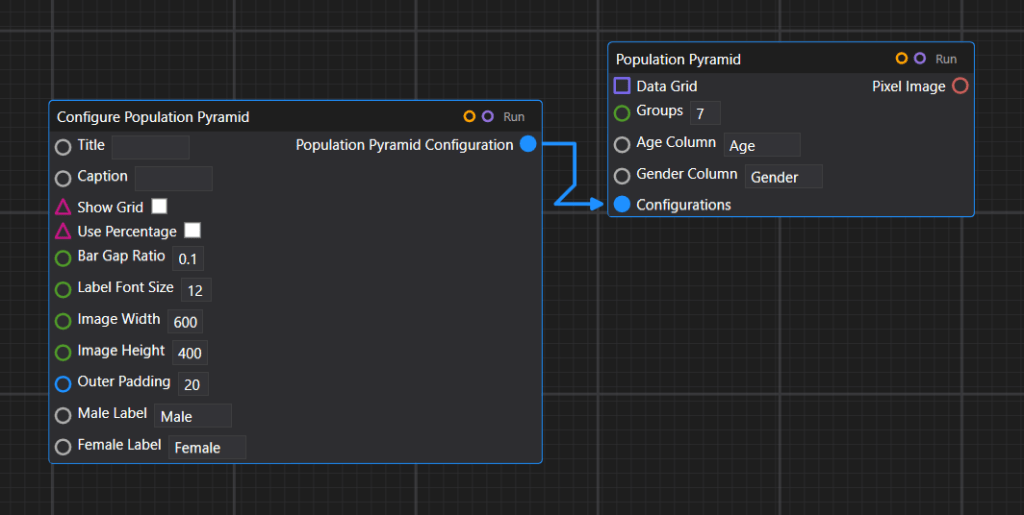
    Visually, we have a ConfigureX node and some nodes that take a configuration parameter as input. This dominant pattern is used in many places, including plotting configuration, OpenAI service configuration, and some other APIs like the image composition API.

    Example of plot configuration

    (Example of plot configuration)

    Example of OpenAI service configuration

    (Example of OpenAI service configuration)

    Example of image composition API

    (Example of image composition API)

    We could provide a few different overrides for creating a configuration—so depending on how many details are needed, one can use a more lightweight or more heavy-duty configure node.

    PostgreSQL with two different configurations

    (PostgreSQL with two different configurations)

    That concludes our introduction to the current setup, but the versatility of Divooka doesn’t end here. Indeed, we could also introduce some kind of GUI panels for advanced configurations, and in fact, that’s desirable for certain things – at the price of losing the capability to programmatically drive the parameter values. This will be an expected standard feature in the full release of Divooka.

    References

    This article reference the following software:

    • Houdini – A professional 3D animation and visual effects software used in film, TV, and games, known for its node-based procedural workflow.
    • Blender – A free and open-source 3D creation suite that supports modeling, animation, simulation, rendering, and more.
    • ComfyUI – A graphical node-based interface for building image generation workflows using AI models like Stable Diffusion.
    • PowerBI – A business analytics tool by Microsoft that lets users visualize data and share insights across an organization.
    • PostgreSQL – A powerful, open-source relational database system with a strong emphasis on extensibility and standards compliance.
    • Divooka – A general purpose programming language for building procedural programs and data flows through node graphs.
    • Zapier – An online automation platform that connects different apps and services to automate workflows without coding.
  • AGI Is Here, Why You Still Need to Learn to Program

    AGI Is Here, Why You Still Need to Learn to Program

    Author: Charles Zhang
    Co-Author: ChatGPT
    Published Date: 2025-03-24
    Last Update: 2025-03-24 (Rev. 001)
    Tags: Concept, Prediction

    When I first started tinkering with code, I remember staring at a blank text editor, feeling equal parts thrill and terror. Back then, no AI was there to autocomplete my thoughts. I had to muscle my way through the syntax errors, the cryptic compiler messages, and the many-hour bug hunts. Yet as time passed, coding didn’t just become easier—it became a doorway into shaping my own little corner of the digital world. Now, we keep hearing that Artificial General Intelligence is right around the corner, ready to revolutionize everything. Some people even suggest we’ve practically arrived at the AGI era already. With AI code generators spinning up entire applications from a few lines of instructions, the question on many minds is: does this herald the end of programming as we know it?

    I don’t think so. And if anything, learning to program is about to become more valuable than it’s ever been.

    Picture this: you’re using one of those AI autopilot tools that writes your code for you. It feels like magic. You type, “Make me a web app that calculates monthly budgets,” and—poof—the scaffolding appears. A lot of folks believe that’s the end of the story. Why learn to write JavaScript or Python when a machine can do it faster? But here’s the catch: you still need to peek under the hood. You need to understand how those lines of code come together, why they’re structured the way they are, and how to adjust them when (not if) reality doesn’t match your initial prompt. AI is fantastic at patterns, yet it can’t grasp the deeper intricacies of your unique business logic, your subtle performance constraints, or the unexpected edge cases that creep in once real humans start using your software.

    For anyone who’s spent more than five minutes maintaining a large codebase, the bigger challenge isn’t just getting something to work; it’s making sure it keeps working when you add new features, adapt to fresh requirements, or try to integrate with other systems that have their own quirks. AI is great for spinning up code, but it isn’t a wizard that can foresee the evolution of your project over time. It’s still people—people who know how to think like developers—who figure out which new libraries to bring in, how to refactor unwieldy pieces of logic, and how to ensure the entire system can scale without collapsing under its own weight.

    And then there’s the matter of customization. Maybe you only need a small language model that can run smoothly on a mid-tier server. Or perhaps your company uses specialized robotics hardware that lacks standard drivers. AI code generators, by default, spit out “best guess” solutions based on public repositories and widely used tech. They’ll guess you want the standard library for X or the typical approach for Y. But if your situation is off the beaten path, you’ll need more than a guess. You’ll need the skill to mold a solution that fits your very particular puzzle. That molding can be done only by someone who understands the underlying logic and can adapt it—not just at the prompt level, but also at the gritty, behind-the-scenes code level.

    A lot of us are also concerned that as AI becomes more capable, it’ll become downright hungry for computational resources. “AGI will solve everything, including energy issues,” some people predict. I beg to differ. Sure, an advanced AI might help optimize usage patterns, but we’re still stuck with physical limitations. Servers need power and cooling. Data centers have to expand. Networking gear has to handle heavier traffic. Unless you’re just spinning up a hobbyist app, you’ll have to factor in these practical constraints. Programming, at its core, is about solving problems within specific parameters, and big energy constraints are about as real as it gets. Knowing how to write efficient code, or at least how to refine AI-generated code to be efficient, can mean a huge difference in cost, performance, and environmental impact.

    I can’t help but imagine a future where AI—perhaps even an AGI—is my collaborator, not my replacement. A well-tuned system can act like an exceptionally skilled teammate who sparks creative ideas, handles repetitive tasks, and streamlines development workflows, but it won’t do everything for me. It still lacks the deeper intuition about my project’s soul, the unique wrinkles in my target market, and the intangible knowledge my team accumulates through trial and error. Good developers must interpret shifting needs, navigate unpredictable obstacles, and sometimes invent brilliant new methods when the usual solutions fail. AI is powerful, but it’s a powerful ally—never the total stand-in.

    There’s also something personal about writing software. I’ll never forget the satisfaction I felt the first time I got a real, paying user to click a button in an app I coded—and it worked. My code did that. There’s an undeniable sense of authorship and creative pride you get when you truly grasp the engine behind the curtain. If your AI assistant writes everything for you, sure, you might feel clever at first, but once the novelty fades, you’ll realize that any deeper control or customization still relies on you knowing the language of computers.

    So yes, maybe you can skip the step-by-step tutorials on how to write loops or handle memory allocation if you plan to rely on AI from the get-go. But eventually, if you want to do serious work, you’ll need a working knowledge of how code actually operates—much like if you wanted to become a great chef, you’d need to know how flavors combine in the pan rather than only reading recipes. That knowledge is your foundation, your safety net, and your launching pad for real innovation. It lets you fix the bugs that an AI can’t see and harness the creative potentials an AI can’t imagine.

    From my perspective, the looming arrival of AGI (or whatever follows next in AI’s evolution) isn’t an obituary for programming. It’s more like an invitation. AI promises to handle the rote, repetitive tasks that used to chew up our time and patience, so we can tackle bigger challenges. The catch is that we have to be prepared to step up to the plate as architects, guardians, and creative minds behind the code. That calls for deeper expertise, not less. The bigger the AI wave, the more crucial it is for us to know how to surf, rather than just watch from the shore.

    Yes, AGI might be just around the corner. Some might argue it’s basically here. But if you’ve ever wanted to shape the future instead of letting it roll over you, I’d say learning to program is still your best move. We’re on the brink of an era where more possibilities than ever are at our fingertips. The trick is knowing how to seize them, and that starts, in no small part, with writing a few lines of code yourself.

    Copyright © 2024-2025 Methodox Technologies, Inc.

  • The Future of Low-Code and Visual Programming for AI-Driven Designs

    The Future of Low-Code and Visual Programming for AI-Driven Designs

    Author: Charles Zhang
    Co-Author: ChatGPT
    Published Date: 2024-09-24
    Last Update: 2024-09-24 (Rev. 001)
    Tags: Concept, Review

    A New Era for Software Development

    As AI systems like Large Language Models (LLMs) take center stage in automating complex tasks, low-code and visual programming environments offer a natural foundation, forming the future landscape of software development. With AI capable of writing, optimizing, and correcting code, the transition to visual programming systems designed around AI-driven workflows can revolutionize development by improving learnability, maintainability, and readability.

    Here, we critically examine how these changes will shape the future, as well as the challenges and opportunities they bring.

    Learnability: AI as a Teacher and Collaborator

    Traditionally, learning to code involves understanding syntax, structure, and best practices—barriers that deter non-experts from creating software. Low-code and visual programming aim to abstract the complexities of traditional programming, replacing lines of code with visual nodes, flowcharts, and intuitive UI elements. By layering AI systems like LLMs on top of these platforms, learners are no longer limited to rigid rules or complex syntax. Existing systems simply represent AI results using traditional programming languages which are nonetheless not maintainable by non-technical users – and visual programming is going to address this problem.

    In a low-code/AI-driven environment:

    • AI can offer contextual explanations or even suggest optimized visual nodes as users create their workflows.
    • Novices can experiment with different approaches, while AI provides real-time guidance, increasing engagement and reducing the steep learning curve.

    More importantly, the visual nature of these environments gives learners a sense of progress, which is often missing in traditional text-based programming. The feedback loop between the human and AI allows for faster iteration, learning, and exploration.

    Maintainability: How AI-Generated Graphs Enhance Sustainability

    Code maintenance is often where the promise of automation breaks down. AI systems that generate code can sometimes create hard-to-read, complex, and opaque outputs, making debugging and future maintenance a challenge. Visual programming changes this dynamic by structuring AI-generated logic into modular, human-readable graphs that are easy to comprehend, debug, and update.

    Key advantages of AI in maintainability:

    • Modular Representation: Visual nodes encapsulate functionality in self-contained units, which can be expanded or collapsed, providing a high-level overview or a detailed breakdown as needed.
    • Automatic Refactoring: AI can suggest changes to optimize performance or reorganize nodes in a graph without altering core functionality.
    • Version Control Integration: Low-code platforms can leverage AI to manage code versions, trace changes, and provide recommendations for reverting to earlier graph states if needed.

    This leads to improved maintainability over time, with the AI not just automating code creation but actively supporting the long-term sustainability of projects by making the structure easier to comprehend and modify.

    Readability: Bridging the Gap Between Developer and Non-Developer Teams

    One of the most significant challenges in traditional software development is code readability—the ability of multiple stakeholders to understand and interpret the logic of the software. Visual programming, especially when combined with AI, makes software development more accessible to non-technical stakeholders.

    In a visual programming context:

    • AI-generated code becomes a graph of connected ideas, which is immediately easier to follow, even for non-developers.
    • Readability is further enhanced as AI optimizes nodes to align with common patterns and best practices, essentially building visual blueprints that map to industry standards.

    For interdisciplinary teams, this means that designers, marketers, and other non-technical contributors can participate more actively in the development process, eliminating the communication gap that often exists between developers and the rest of the team. AI-driven visual graphs provide a shared language where technical and non-technical team members can collaborate effectively.

    Critical Challenges and Future Prospects

    While AI and visual programming open up tremendous potential, challenges remain:

    • Trust and Transparency: As LLMs and AI automate more tasks, the transparency of AI-generated code (or graphs) may come into question. Teams will need mechanisms to verify and understand the decisions made by AI systems to maintain trust.
    • Scalability of Graphs: While visual programming is intuitive, large-scale applications may produce sprawling graphs that become difficult to navigate. This requires innovation in graph management tools that can simplify and abstract complexity when needed.
    • Human-in-the-Loop Systems: While AI is a powerful collaborator, the importance of human oversight remains critical. Balancing AI autonomy with human decision-making will define the effectiveness of these systems.

    In the long term, low-code platforms that leverage AI will become more robust, integrating deeply into various industries—from software development to manufacturing and education. AI will act not only as a tool for writing code but as a collaborator in building software that is adaptable, maintainable, and understandable by diverse teams. This democratization of development tools will be key to making technology more accessible and usable, not just for experts but for anyone with an idea.

    Ultimately, the fusion of AI and visual programming heralds a future where software development feels less like engineering and more like creating.

    Conclusion

    In summary, low-code visual programming is the heart of AI-driven capabilities of the future, offering improved learnability, maintainability, and readability of software solutions while bringing new challenges that the industry will have to address head-on. This vision of development, where both novice and expert collaborate with AI in a visual computing environment to shape ideas into reality, will redefine the very nature of problem solving itself.

    Copyright © 2024-2025 Methodox Technologies, Inc.

  • Unlocking the Power of Node-Based Interfaces for DSL Implementation

    Unlocking the Power of Node-Based Interfaces for DSL Implementation

    Author: Charles Zhang
    Co-Author: ChatGPT
    Published Date: 2024-08-03
    Last Update: 2024-08-03 (Rev. 001)
    Tags: Introduction, #Technical, Guide

    In the rapidly evolving landscape of software development, the need for adaptable and user-friendly programming tools has never been greater. One approach gaining traction is the use of highly extensible general-purpose visual programming platforms, particularly those utilizing node-based interfaces. These platforms offer a low-cost, low-overhead, and highly effective way to implement and use domain-specific languages (DSLs), making them a compelling choice for developers and businesses alike.

    Visual Programming Platforms: A Brief Overview

    Visual programming platforms allow users to create programs by manipulating elements graphically rather than by specifying them textually. This approach leverages a node-based interface, where nodes represent various functions, processes, or data inputs and outputs, and connections between them define the program’s flow. By dragging and connecting these nodes, users can build complex workflows and applications intuitively.

    Why Node-Based Interfaces Excel in DSL Implementation

    1. Intuitive and Accessible Design

    One of the primary advantages of node-based interfaces is their intuitiveness. Unlike traditional code, which can be dense and difficult to decipher, visual representations are more accessible, especially for those who may not have a deep programming background. This democratizes the development process, allowing a broader range of users to participate in creating and modifying DSLs.

    1. Enhanced Collaboration and Communication

    Visual programming platforms foster better communication among team members. The graphical nature of node-based interfaces makes it easier for stakeholders to understand and contribute to the development process. This clarity can lead to more effective collaboration, reducing the likelihood of miscommunication and ensuring that all team members are aligned with the project’s goals.

    1. Modularity and Reusability

    Node-based interfaces inherently promote modularity. Each node can represent a discrete function or process, which can be reused across different projects. This modular approach not only saves time and effort but also enhances the maintainability of the code. Developers can update or replace individual nodes without disrupting the entire system, leading to more efficient and sustainable development practices.

    1. Seamless Integration with APIs and Microservices

    The rise of microservices and API-driven architectures has transformed how software is developed and deployed. Node-based interfaces are particularly well-suited for these environments. APIs can be encapsulated within nodes, allowing developers to easily integrate and orchestrate various services. This approach simplifies the construction of complex workflows, as developers can visually map out how different services interact and exchange data.

    Case Study: Visual Programming in Business Functions

    Consider a scenario where a company needs to automate its business processes, such as order processing, inventory management, and customer support. Traditionally, this would require extensive coding and integration work, often involving multiple teams and considerable resources.

    With a visual programming platform, the company can create a custom DSL tailored to its specific needs. Nodes representing different business functions (e.g., “Check Inventory,” “Process Order,” “Send Confirmation Email”) can be connected to form a coherent workflow. As new requirements arise, additional nodes can be introduced or existing ones modified with minimal disruption.

    Low-Cost and Low-Overhead Solution

    Implementing DSLs using a visual programming platform is both cost-effective and resource-efficient. The reduced need for specialized programming skills lowers the barrier to entry, enabling organizations to leverage their existing workforce. Additionally, the modular nature of node-based interfaces minimizes the overhead associated with maintaining and updating the codebase.

    Conclusion

    In the quest for more efficient and user-friendly development tools, highly extensible general-purpose visual programming platforms stand out as a powerful solution for implementing domain-specific languages. Their intuitive, modular, and visually engaging nature makes them an ideal choice for businesses and developers looking to streamline their workflows and enhance collaboration. As the software development landscape continues to evolve, the adoption of node-based interfaces for DSL implementation is likely to grow, offering a flexible and accessible path to innovation.

  • Subgraphs: Essential Building Blocks for Visual Programming Platforms

    Subgraphs: Essential Building Blocks for Visual Programming Platforms

    Author: Charles Zhang
    Co-Author: ChatGPT
    Published Date: 2024-08-01
    Last Update: 2024-08-01 (Rev. 001)
    Tags: Introduction, #Technical, Guide

    In the realm of visual programming, breaking down complex tasks into manageable components is key to creating effective and scalable solutions. One of the most powerful techniques to achieve this is through the use of subgraphs. By leveraging subgraphs, developers can abstract functionalities, streamline workflows, and enhance collaboration. In this article, we’ll explore the necessity of subgraphs in any useful visual programming platform and delve into two forms: document referencing and subgraphs within the current document.

    The Necessity of Subgraphs

    Visual programming platforms aim to make coding more intuitive by using graphical representations of logic and processes. However, as projects grow in complexity, managing and organizing these visual elements can become challenging. This is where subgraphs come into play. Subgraphs allow developers to:

    • Abstraction of Functionalities: By encapsulating complex logic into subgraphs, developers can create reusable components that simplify the main workflow.
    • Enhance Readability: Breaking down large graphs into smaller, more focused subgraphs makes the overall structure easier to understand and maintain.
    • Facilitate Collaboration: Subgraphs enable multiple team members to work on different parts of a project simultaneously, improving efficiency and collaboration.

    Two Forms of Subgraphs

    1. Document Referencing

    Document referencing involves defining functions and processes in separate files or documents. These referenced documents contain subgraphs that can be called and executed from the main graph. This approach offers several advantages:

    • Separation of Concerns: By isolating specific functionalities in separate documents, developers can focus on individual components without getting overwhelmed by the entire project.
    • Modularity: Document referencing promotes modularity, making it easier to update or replace individual components without affecting the rest of the project.
    • Scalability: Large projects can be broken down into smaller, manageable documents, allowing teams to work on different modules independently.

    Example: Imagine a project that involves data processing, user authentication, and report generation. Each of these tasks can be defined in separate documents. The main graph references these documents, ensuring that each module is developed and maintained independently.

    2. Subgraphs Within the Current Document

    Subgraphs within the current document involve defining sections of processes or subprocesses directly within the same file. This approach keeps everything self-contained, providing a conceptually clean and convenient structure:

    • Single-File Simplicity: Keeping all subgraphs within a single document ensures that the entire project is contained in one file, making it easier to share and manage.
    • Integrated Workflow: Subgraphs within the same document allow for seamless integration and interaction between different parts of the project.
    • Conceptual Clarity: Just like multiple worksheets in an Excel workbook, subgraphs within the same document provide a clear, organized view of different processes.

    Example: Consider an Excel workbook with multiple worksheets, each representing a different aspect of the same project. Similarly, a visual programming project can have a main graph with embedded subgraphs, each handling a specific part of the workflow, such as data input, processing, and output, all within the same file.

    Organizational and Collaborative Benefits

    From an organizational and management perspective, both forms of subgraphs offer unique advantages:

    • Document Referencing for Large Projects: When dealing with large, complex projects, separating documents is ideal. It allows different team members to work on separate modules simultaneously, ensuring a clear separation of concerns. This approach enhances collaboration and makes it easier to manage and scale the project.
    • Subgraphs Within a Single Document for Simplicity: For smaller projects or when a self-contained solution is preferred, keeping everything within a single document is more convenient. It provides a cohesive, integrated view of the entire project, making it easier to understand and manage.

    The Advantages of Divooka

    At Methodox Technologies, our Divooka platform is designed with these principles in mind. Divooka supports both forms of subgraphs, providing developers with the flexibility to choose the best approach for their projects:

    • Seamless Document Referencing: Divooka allows for easy referencing of external documents, promoting modularity and scalability in large projects.
    • Integrated Subgraphs: Our platform also supports subgraphs within the same document, offering a convenient and conceptually clean solution for smaller projects.

    By leveraging the power of subgraphs, Divooka empowers professionals to tackle complex tasks efficiently, enhance collaboration, and create scalable, maintainable solutions. Whether you’re working on a large, multi-module project or a simple, self-contained workflow, Divooka provides the tools you need to succeed.

    With Divooka, the future of visual programming is here. Embrace the power of subgraphs and unlock new possibilities in your projects. Are you ready to revolutionize the way you work and share?

    Copyright © 2024-2025 Methodox Technologies, Inc.

  • The Challenges of Making A General Purpose Visual Programming Platform

    The Challenges of Making A General Purpose Visual Programming Platform

    Author: Charles Zhang
    Co-Author: ChatGPT
    Published Date: 2024-07-31
    Last Update: 2025-03-24 (Rev. 003)
    Tags: Introduction, #Technical
    Changes:
    – Rev. 003: Update title

    Introduction

    Visual programming platforms have revolutionized how we think about software development, making it more accessible to those without a deep understanding of text-based coding. It’s also a trend for the future, when people code less about implementation and focus more on execution. Despite their success in specific domains, creating a general-purpose visual programming platform remains a formidable challenge. This article delves into the high-level goals, practical requirements, and technical challenges of such an endeavor, highlighting the gap between domain-specific tools and general-purpose text-based programming languages.

    High-Level Goals

    1. Accessibility and Usability
      A general-purpose visual programming platform aims to make programming more accessible to non-experts while still being powerful enough for experienced developers. This requires a delicate balance between simplicity and flexibility, ensuring the platform is intuitive without sacrificing functionality.
    2. Versatility
      The platform must support a wide range of applications, from web development and data analysis to game development and automation. This versatility demands a robust and flexible architecture capable of handling diverse programming paradigms and use cases.
    3. Scalability
      As projects grow in complexity, the platform must scale accordingly. This involves managing increasingly complex visual representations without overwhelming the user, maintaining performance, and ensuring that the system can handle large-scale applications.

    Practical Requirements

    1. Intuitive Interface
      A user-friendly interface that minimizes the learning curve is essential. This involves designing visual metaphors that are easily understood and manipulated, providing comprehensive documentation and tutorials, and ensuring seamless interaction between visual elements.
    2. Comprehensive Library Support
      To be versatile, the platform must support a broad array of libraries and frameworks. This requires not only integrating popular libraries but also ensuring that users can easily extend the platform with new ones, catering to their specific needs, and connecting with existing services.
    3. Cross-Platform Compatibility
      In today’s multi-device world, the platform must operate seamlessly across various operating systems and devices. This ensures that users can work on their projects regardless of their preferred environment, enhancing collaboration and flexibility.
    4. Performance and Efficiency
      Efficiency is crucial both in terms of runtime performance and code management. The platform must execute visual graphs swiftly and manage resources effectively, ensuring that performance does not degrade as projects scale in size and complexity. At the same time, it should offer efficient ways for code management, including useful refactoring and code organization utilities.

    Technical Challenges

    1. Graphical Representation of Complex Logic
      Representing complex programming logic visually is inherently challenging. Ensuring that visual representations remain comprehensible as the logic grows in complexity is a significant hurdle. This involves designing intuitive ways to visualize loops, conditionals, and other control structures without creating clutter.
    2. Integration with Existing Tools and Ecosystems
      A general-purpose visual programming platform must integrate seamlessly with existing development tools, languages, and ecosystems. Achieving this requires extensive interoperability and the ability to translate visual constructs into efficient code that works well with established workflows.
    3. Debugging and Error Handling
      Debugging visual programs presents unique challenges. Traditional text-based debugging tools rely on breakpoints and stack traces, which are harder to represent visually. Developing effective visual debugging tools that allow users to trace execution flow, inspect variables, and resolve errors is a complex task.
    4. Maintaining Performance
      Ensuring that the platform performs well under various conditions is vital. This includes optimizing the execution of visual programs, managing memory effectively, and providing responsive user interactions. Balancing these performance requirements with the need for a rich, feature-complete environment is difficult.
    5. Extensibility and Customization
      To cater to diverse user needs, the platform must be highly extensible and customizable. This involves providing a robust API for users to develop their own modules and plugins, ensuring that these extensions integrate smoothly with the core platform without compromising stability or performance.

    Comparison with Domain-Specific Tools and Text-Based Languages

    1. Domain-Specific Visual Tools
      Domain-specific visual programming tools, such as Unreal Engine’s Blueprints for game development or Node-RED for IoT, excel in their niches by offering tailored functionalities and optimizations. However, their focus limits their applicability outside their respective domains. This specialization makes them highly effective within their scope but inadequate for broader use cases.
    2. General-Purpose Text-Based Languages
      Text-based languages like Python, JavaScript, and C# offer unparalleled flexibility and power, supporting a vast range of applications. They benefit from mature ecosystems, extensive libraries, and powerful debugging tools. However, their complexity can be a barrier for non-programmers, and they lack the intuitive, visual approach that could make programming more accessible.
    3. The Gap
      There is a clear gap between these two extremes. For users who need more flexibility than domain-specific tools offer but find text-based languages too daunting, a general-purpose visual programming platform could provide the perfect middle ground. Such a platform would democratize programming, enabling a broader audience to create complex applications without deep coding knowledge.

    Conclusion

    Creating a general-purpose visual programming platform is a daunting but potentially revolutionary endeavor. The high-level goals of accessibility, versatility, and scalability must be met while overcoming significant practical and technical challenges. By bridging the gap between domain-specific tools and general-purpose text-based languages, such a platform could empower a new generation of developers and innovators, making programming more accessible and enjoyable for all.

    Copyright © 2024-2025 Methodox Technologies, Inc.

  • How to Choose the Right Low-Code, No-Code, or Process Automation Platform

    How to Choose the Right Low-Code, No-Code, or Process Automation Platform

    Author: Charles Zhang
    Co-Author: ChatGPT
    Published Date: 2024-07-31
    Last Update: 2025-04-14 (Rev. 004)
    Tags: #Basic, Guide, Introduction, Low-Code, No-Code, Visual Programming

    In today’s fast-paced business environment, the demand for rapid development and automation has driven the rise of low-code, no-code, and process automation platforms. These tools empower users to create applications, automate workflows, and streamline processes without needing extensive coding knowledge. However, with numerous options available, choosing the right platform can be a daunting task. This article aims to guide you through the decision-making process, highlighting key factors to consider and introducing the distinct advantages of platforms like Divooka by Methodox Technologies, Inc.

    Beyond these considerations, it’s also important to note the emerging role of large language models (LLMs) and AI code generators in the development landscape. As natural language interfaces become increasingly sophisticated, they may, in many cases, substitute for no-code platforms that rely on pre-built templates and limited customization. When comparing solutions, be aware that while a no-code platform can kickstart a project quickly, it may also lock you into certain templates and restrict fine programmability — a limitation that is often circumvented with AI-driven code generation.

    Key Factors to Consider

    1. Scalability

    When choosing a platform, it’s essential to consider its ability to grow with your needs. A good platform should support everything from small projects to large, enterprise-level applications without compromising performance.

    2. Integration Capabilities

    Seamless integration with existing systems and tools is crucial. The platform should connect easily with other software and databases to ensure smooth data flow and process continuity. Ideally, such an integration process can happen gradually so as to avoid setup costs.

    3. Customization and Flexibility

    A versatile platform should allow extensive customization to meet your specific requirements. Look for tools that offer flexibility in design and functionality, enabling you to create tailored solutions. It’s also important to avoid vendor lock-in—avoid platforms that intentionally build strong dependencies and make it hard for migration.

    4. User-Friendliness

    The platform should provide an intuitive interface that is easy to learn and use, even for non-technical users. A user-friendly environment encourages trying and making mistakes, accelerates the development process, and produces more fruitful outcomes. It’s also important to check the platform has rich, abundant documentation and a vibrant online community so it’s easy to get help when stuck.

    5. Cross-Platform Compatibility

    Consider platforms that offer cross-platform compatibility, allowing you to develop and deploy applications across various operating systems and devices. This ensures broader accessibility for your team and future users.

    Addressing Common Pitfalls

    1. Avoiding Fragmentation

    Ensure the platform you choose offers a cohesive and integrated environment to avoid the common issue of fragmented systems where tools and components do not work seamlessly together.

    2. Managing Complexity

    Some platforms can become overly complex, making it difficult for users to manage and maintain their applications. Opt for solutions that balance functionality and simplicity.

    3. Avoiding Upfront Costs

    A good platform should support easy and gradual integration, aligning well with Agile methodologies and avoiding unnecessary commitments. This allows teams to adapt and expand their use of the platform incrementally, ensuring that it meets their evolving needs without overwhelming resources. Lightweight solutions are particularly beneficial, as they allow for flexible structuring suited to dynamic applications and reduce the need for extensive IT maintenance or support. This combination of gradual integration and low maintenance overhead makes it easier for organizations to adopt and scale the platform effectively.

    4. Considering the Advent of LLMs and Code Generators

    With AI-enabled code generators and large language models on the rise, organizations have more options than ever. While traditional no-code platforms can help create basic applications quickly, they often rely on rigid templates and limited customization. In contrast, LLMs can generate code directly from natural language prompts, providing greater flexibility and potentially reducing the long-term need for no-code interfaces. When assessing a platform, keep in mind how these emerging AI capabilities may impact your project’s longevity, customization needs, and total costs.

    Introducing Divooka Computing by Methodox Technologies

    Divooka stands out as a robust solution that addresses many of the challenges associated with low-code, no-code, and process automation platforms. Here’s how Divooka excels in the key areas:

    Scalability
    Divooka’s modular architecture and cloud capabilities ensure the platform can scale with your needs, whether for small tasks or large enterprise projects.

    Integration Capabilities
    Using standardized languages like C# and Python, Divooka integrates seamlessly with existing systems and tools, enhancing compatibility and reducing the need for custom connectors.

    Customization and Flexibility
    Divooka’s node-based interface allows for extensive customization, enabling users to easily create tailored solutions that precisely meet their requirements.

    User-Friendliness
    The intuitive flowchart-like, drag-and-drop interface of Divooka accelerates the development process and reduces the learning curve, making it accessible to both technical and non-technical users.

    Cross-Platform Compatibility
    Divooka offers cross-platform desktop applications that run seamlessly across various operating systems. Its web-enabled front-end provides cloud access, allowing users to work from anywhere with internet connectivity.

    Additional Advantages of Divooka

    Everyday Computational Needs
    Divooka isn’t just for workflow automation; it’s versatile enough for everyday computational tasks and ad-hoc analysis, making it a valuable tool for various applications.

    Local Machine Execution
    Built to run on local machines from day one, Divooka avoids complex infrastructure setup. It’s clean, portable, and free from the overhead of complicated setups.

    Minimal Overhead
    Divooka doesn’t add unnecessary complexity on top of C# and Python, making it easier to modify, integrate, and extend. This also means there’s no technology debt or migration hurdle since workflows closely match the underlying code.

    Permissive License
    Designed from the ground up to be highly manageable and (eventually) open source, Divooka offers transparency and control, giving users the confidence to adapt and extend the platform to suit their needs, while ensuring greater general accessibility without paying.

    Conclusion

    Choosing the right low-code, no-code, or process automation platform requires careful consideration of factors like scalability, integration capabilities, customization, user-friendliness, and cross-platform compatibility. It’s also important to factor in the rapid evolution of AI-driven development—though no-code platforms can be powerful and easy to use, LLMs and code generators may offer more fine-grained control.

    Divooka is a solution that excels in these aspects, providing a scalable, flexible, and user-friendly platform built on robust technologies like C# and Python. Its comprehensive features and seamless integration capabilities make it a strong contender in the realm of code-free solutions.

    By making an informed decision, you can harness the power of these platforms to drive innovation, streamline processes, and achieve your business goals more efficiently.

    Copyright © 2024-2025 Methodox Technologies, Inc.