Tag: GUI

  • The Divooka Way – Part 1: Philosophically, How Exactly is Divooka Different and Useful Compared to Plain Good Code API

    Written by: Charles Zhang
    Tags: Visual Programming, Developer Tools, API Design, Software Architecture, Programming Paradigms, NVI, No-Code / Low-Code, Programming Philosophy, Tool Economy
    Target Audience: Software Architects, Engine and Tool Developers, Programming Educators and Curriculum Designers, Low-Code/No-Code Platform Researchers, Senior Developers interested in alternative programming models, Developers interested in visual alternatives to traditional code

    This Part 1 focuses on raw API usage. A Part 2 will follow on Morpheus and its derivatives. This article offers high-level analysis and is not intended for beginners.

    Abstract

    Traditional programming uses text to represent program logic. Existing visual design platforms offer varying levels of programmability but generally focus on building specific kinds of applications. From a production-use perspective, Divooka represents a significant step forward in how users build and interact with software – by combining tool-building, data handling, and program logic under a single, coherent interface. This unified approach aims to deliver a substantial productivity boost.

    Overview

    If we already have a really good library – just as we have high-quality commercial software – does it still matter what language or environment we use?

    In theory, it shouldn’t. In practice, it absolutely does.

    Pretty much everything imaginable already exists for C++, often under GNU licenses. But that doesn’t mean a Python, C#, or Java developer can easily access or use those resources. Even when libraries are available for a target language, usage may not be straightforward. Licensing, API design, and documentation all come into play.

    Still, let’s imagine we have a well-written, freely accessible, multi-language-bound, well-documented, and easy-to-use library. Does it then matter how we use it?

    That leads us to the core question:

    If we already have a really good API, why not just use it in C#, Python, C++, Lua, or Pure?

    The Proof of Concept

    To explore this, we can approach the question from three distinct perspectives:

    1. The end user
    2. The program designer
    3. Everyday tool development and sharing

    From the end user’s perspective, assuming the final deliverable is a polished CLI or GUI tool, it typically doesn’t matter what language was used – as long as the interface is well-designed. Case closed.

    From the program designer’s perspective, building anything sophisticated involves significant “dry” work – debugging, iteration, architectural decisions. Productivity depends largely on the quality of the debugger and IDE, and again, it’s not strictly tied to the programming language.

    But from the perspective of everyday tool use, the question becomes more subtle. What do we mean by “everyday tools”? Broadly speaking, we mean:

    1. Tools built quickly to solve practical problems within days
    2. Tools that are easy to share and use by others
    3. Tools that are easy to iterate, improve, refactor, and eventually package as full software
    4. Tools that are maintainable – so that months later, we can return and still understand what we were doing, without extensive documentation effort

    To solve (1), you need extensive libraries.
    To solve (2), you need solid dependency and packaging mechanisms.
    To solve (3), you need simple syntax and easy refactoring.
    To solve (4), you need expressive, self-documenting code – or better yet, self-explanatory program design.

    It’s in this third category – everyday tools – that Divooka stands out. The features baked into Divooka’s graph editor enable rapid development without sacrificing performance or scalability. The editor itself proves how smoothly things can run with minimal setup: just open a graph document, and it works.

    The NVI

    In Divooka, the primary mode of interaction is the Node Visual Interface (NVI) – distinct from both CLI and GUI paradigms.

    Each node represents a functional unit, and the connections represent program or data flow. Unlike CLI, NVI offers “autocomplete” visually – everything is made explicit through connection and layout. Unlike a GUI, an NVI is composed entirely of nodes and avoids complex syntax structures.

    At the base is a node canvas, and programs are built using what we call node-driven design – a pattern that breaks software into node blocks, each representing a compositional or procedural component.

    The main disadvantage of NVI compared to text-based programming is space inefficiency: nodes occupy screen real estate, reducing information density. But this is offset by improved readability: the visual layout shows the exact dependencies between functional units – something much harder to grasp in linear text code.

    NVI becomes more powerful when it supports:

    1. Subgraphs – Logical groups of nodes encapsulated into single blocks. This is more compact than plain functions or classes and more intuitive than managing multiple files.
    2. Extensible node visuals – Nodes can be customized for specific data. For example, a Table node can offer compact entry for 2D data, reducing friction.

    The Scripting Interface

    At its core, the NVI exposes functionality in two ways:

    1. Nodes represent standalone functional units in a Divooka document.
    2. A framework parses the interconnected nodes and derives behavior from the graph structure.

    The key is interface availability – file operations, media I/O, math routines, etc.

    The first use case is covered well by scripting languages like Python, Lua, or Jupyter.
    The second – interpreting a structured node graph into dynamic program behavior – is where traditional languages fall short, often requiring large, specialized frameworks (e.g., Streamlit for Python).

    With Divooka, the same graphical program often needs no changes at all. A simple toggle in the host environment can completely redefine how the program behaves.

    Frameworks like Glaze, Novella, Ol’ista, Slide Present, and App Builder (all part of Divooka Explore except App Builder) rely heavily on metadata – information not defined on the graph, but embedded in the document and interpreted by the host system.

    This separation – code in the graph, behavior defined by metadata – creates a powerful, data-driven model that enables reuse, variation, and flexibility.

    On the Matter of Libraries

    Not all useful features are readily available via libraries. And even when they are, compatibility issues, licenses, platform differences, and interoperability challenges often make reuse hard or impossible.

    At Methodox, we actively author and maintain a curated library set – toolboxes optimized for Divooka. This represents a major investment, ensuring that as Divooka grows, users have an expanding, well-integrated set of native components tailored for node-driven environments.

    Summary

    From a scripting standpoint, Divooka may appear unremarkable: libraries are still authored in native code, and Divooka simply provides an interface layer.

    But methodologically, Divooka offers a profound shift in how we build and interact with programs. It’s as different as using a natural-language model to co-write your software.

    Divooka is a high-level, GUI-native, NVI-first programming system. Our belief is that this new format can significantly enhance productivity, readability, and maintainability by making programs smaller, clearer, less error-prone, and more intuitive.
  • A General Service Configuration Scheme in Graphical Context

    Tags: Design, Visual Programming, Design Language, Configuration, Research
    Author: Charles Zhang
    Publication Date: 2025-05-13
    Target Audience: General User, Visual Programming Language Researcher
    Keywords: GUI, Good Design

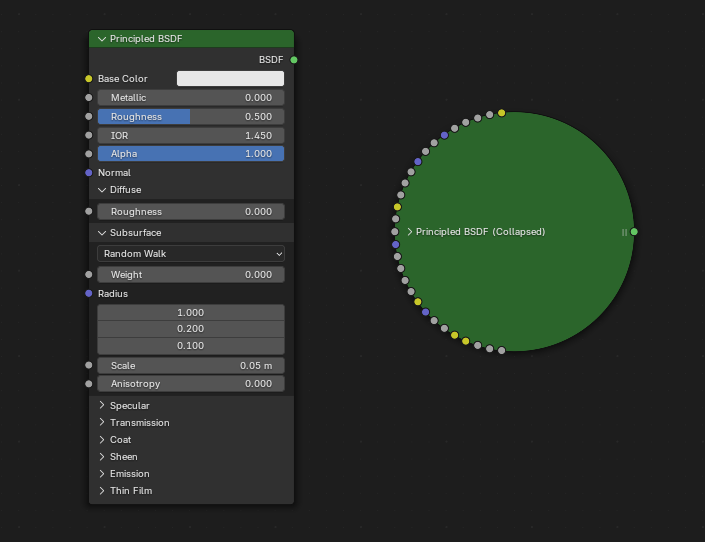
    In this article, we take a look at one emerging pattern that provides a straightforward and compact way to configure services. Generally speaking, when a function expects many inputs, the most straightforward way is to directly expose those on the node. However, this quickly makes the node gigantic in size.

    Node with many parameters

    (Node with many parameters)

    Example in ComfyUI

    (Example in ComfyUI)

    When a node has too many parameters, it becomes bulky.

    Example in Blender

    (Example in Blender)

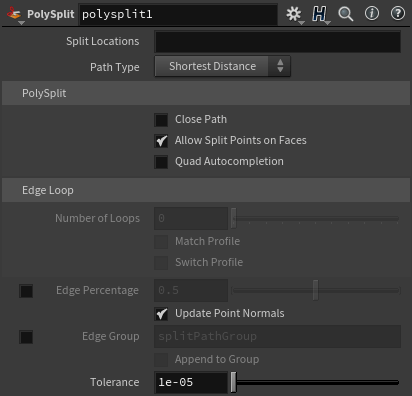
    This quickly becomes infeasible when even more complex parameters are required for the functioning of nodes—for instance, if it’s an online service with many potential configuration settings. A typical approach is thus to utilize a GUI element, which we shall call a “node properties panel.” Below is a sophisticated example from Houdini. PowerBI and Zapier do similar things.

    Houdini node configuration panel

    (Houdini node configuration panel)

    This method falls short for two reasons:

    1. It’s not explicit, and configuration parameters are not visible on the graph. Which makes it not possible to see dataflow nor to programmatically drive those values.

    2. It requires a dedicated GUI and can only be configured within that GUI.

    Usually, some kind of scripting or expression language is used to address the first problem. For instance, in Houdini, users often write VEX snippets or Python expressions inside parameter fields to control behavior dynamically. In Zapier, configuration can include custom JavaScript code or formulas in input fields to manipulate data between steps. These workarounds bring back some level of flexibility, but at the cost of breaking the visual flow and requiring users to write code inside otherwise “no-code” or “low-code” environments.

    One design goal of Divooka is to be frontend-agnostic. The currently released frontend is officially known as “Neo”, which is a WPF-based technology. However, Divooka graphs are designed to be generic enough to be visualized on different frontends—ideally in a way that’s very easy to implement. That’s why we prefer to expose everything explicitly, so no specialized logic is required on the frontend (e.g., to be aware of the nodes they are dealing with).

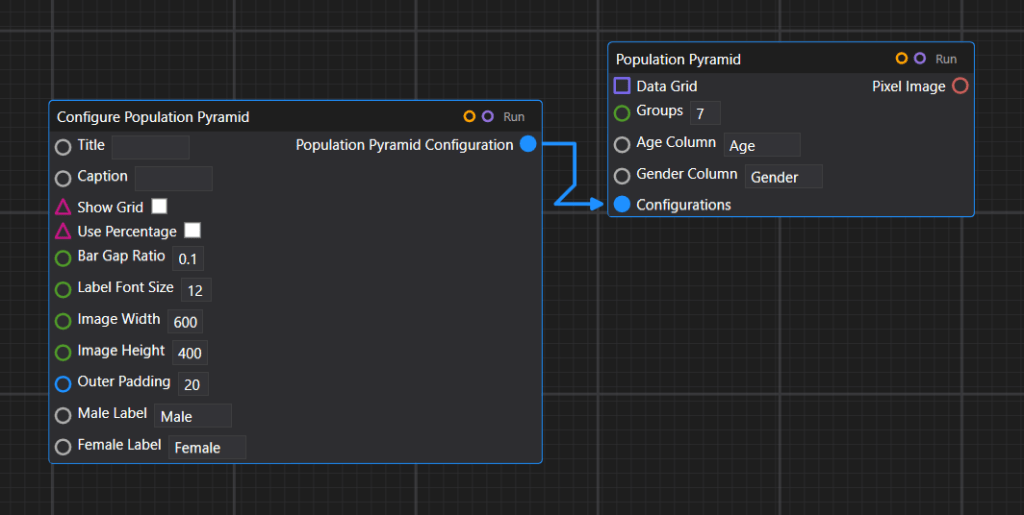
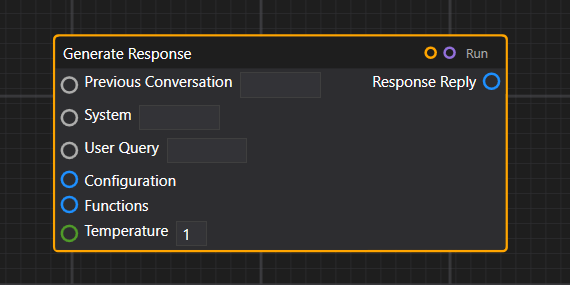
    Visually, we have a ConfigureX node and some nodes that take a configuration parameter as input. This dominant pattern is used in many places, including plotting configuration, OpenAI service configuration, and some other APIs like the image composition API.

    Example of plot configuration

    (Example of plot configuration)

    Example of OpenAI service configuration

    (Example of OpenAI service configuration)

    Example of image composition API

    (Example of image composition API)

    We could provide a few different overrides for creating a configuration—so depending on how many details are needed, one can use a more lightweight or more heavy-duty configure node.

    PostgreSQL with two different configurations

    (PostgreSQL with two different configurations)

    That concludes our introduction to the current setup, but the versatility of Divooka doesn’t end here. Indeed, we could also introduce some kind of GUI panels for advanced configurations, and in fact, that’s desirable for certain things – at the price of losing the capability to programmatically drive the parameter values. This will be an expected standard feature in the full release of Divooka.

    References

    This article reference the following software:

    • Houdini – A professional 3D animation and visual effects software used in film, TV, and games, known for its node-based procedural workflow.
    • Blender – A free and open-source 3D creation suite that supports modeling, animation, simulation, rendering, and more.
    • ComfyUI – A graphical node-based interface for building image generation workflows using AI models like Stable Diffusion.
    • PowerBI – A business analytics tool by Microsoft that lets users visualize data and share insights across an organization.
    • PostgreSQL – A powerful, open-source relational database system with a strong emphasis on extensibility and standards compliance.
    • Divooka – A general purpose programming language for building procedural programs and data flows through node graphs.
    • Zapier – An online automation platform that connects different apps and services to automate workflows without coding.
  • Unlocking the Power of Node-Based Interfaces for DSL Implementation

    Unlocking the Power of Node-Based Interfaces for DSL Implementation

    Author: Charles Zhang
    Co-Author: ChatGPT
    Published Date: 2024-08-03
    Last Update: 2024-08-03 (Rev. 001)
    Tags: Introduction, #Technical, Guide

    In the rapidly evolving landscape of software development, the need for adaptable and user-friendly programming tools has never been greater. One approach gaining traction is the use of highly extensible general-purpose visual programming platforms, particularly those utilizing node-based interfaces. These platforms offer a low-cost, low-overhead, and highly effective way to implement and use domain-specific languages (DSLs), making them a compelling choice for developers and businesses alike.

    Visual Programming Platforms: A Brief Overview

    Visual programming platforms allow users to create programs by manipulating elements graphically rather than by specifying them textually. This approach leverages a node-based interface, where nodes represent various functions, processes, or data inputs and outputs, and connections between them define the program’s flow. By dragging and connecting these nodes, users can build complex workflows and applications intuitively.

    Why Node-Based Interfaces Excel in DSL Implementation

    1. Intuitive and Accessible Design

    One of the primary advantages of node-based interfaces is their intuitiveness. Unlike traditional code, which can be dense and difficult to decipher, visual representations are more accessible, especially for those who may not have a deep programming background. This democratizes the development process, allowing a broader range of users to participate in creating and modifying DSLs.

    1. Enhanced Collaboration and Communication

    Visual programming platforms foster better communication among team members. The graphical nature of node-based interfaces makes it easier for stakeholders to understand and contribute to the development process. This clarity can lead to more effective collaboration, reducing the likelihood of miscommunication and ensuring that all team members are aligned with the project’s goals.

    1. Modularity and Reusability

    Node-based interfaces inherently promote modularity. Each node can represent a discrete function or process, which can be reused across different projects. This modular approach not only saves time and effort but also enhances the maintainability of the code. Developers can update or replace individual nodes without disrupting the entire system, leading to more efficient and sustainable development practices.

    1. Seamless Integration with APIs and Microservices

    The rise of microservices and API-driven architectures has transformed how software is developed and deployed. Node-based interfaces are particularly well-suited for these environments. APIs can be encapsulated within nodes, allowing developers to easily integrate and orchestrate various services. This approach simplifies the construction of complex workflows, as developers can visually map out how different services interact and exchange data.

    Case Study: Visual Programming in Business Functions

    Consider a scenario where a company needs to automate its business processes, such as order processing, inventory management, and customer support. Traditionally, this would require extensive coding and integration work, often involving multiple teams and considerable resources.

    With a visual programming platform, the company can create a custom DSL tailored to its specific needs. Nodes representing different business functions (e.g., “Check Inventory,” “Process Order,” “Send Confirmation Email”) can be connected to form a coherent workflow. As new requirements arise, additional nodes can be introduced or existing ones modified with minimal disruption.

    Low-Cost and Low-Overhead Solution

    Implementing DSLs using a visual programming platform is both cost-effective and resource-efficient. The reduced need for specialized programming skills lowers the barrier to entry, enabling organizations to leverage their existing workforce. Additionally, the modular nature of node-based interfaces minimizes the overhead associated with maintaining and updating the codebase.

    Conclusion

    In the quest for more efficient and user-friendly development tools, highly extensible general-purpose visual programming platforms stand out as a powerful solution for implementing domain-specific languages. Their intuitive, modular, and visually engaging nature makes them an ideal choice for businesses and developers looking to streamline their workflows and enhance collaboration. As the software development landscape continues to evolve, the adoption of node-based interfaces for DSL implementation is likely to grow, offering a flexible and accessible path to innovation.

  • How to Choose the Right Low-Code, No-Code, or Process Automation Platform

    How to Choose the Right Low-Code, No-Code, or Process Automation Platform

    Author: Charles Zhang
    Co-Author: ChatGPT
    Published Date: 2024-07-31
    Last Update: 2025-04-14 (Rev. 004)
    Tags: #Basic, Guide, Introduction, Low-Code, No-Code, Visual Programming

    In today’s fast-paced business environment, the demand for rapid development and automation has driven the rise of low-code, no-code, and process automation platforms. These tools empower users to create applications, automate workflows, and streamline processes without needing extensive coding knowledge. However, with numerous options available, choosing the right platform can be a daunting task. This article aims to guide you through the decision-making process, highlighting key factors to consider and introducing the distinct advantages of platforms like Divooka by Methodox Technologies, Inc.

    Beyond these considerations, it’s also important to note the emerging role of large language models (LLMs) and AI code generators in the development landscape. As natural language interfaces become increasingly sophisticated, they may, in many cases, substitute for no-code platforms that rely on pre-built templates and limited customization. When comparing solutions, be aware that while a no-code platform can kickstart a project quickly, it may also lock you into certain templates and restrict fine programmability — a limitation that is often circumvented with AI-driven code generation.

    Key Factors to Consider

    1. Scalability

    When choosing a platform, it’s essential to consider its ability to grow with your needs. A good platform should support everything from small projects to large, enterprise-level applications without compromising performance.

    2. Integration Capabilities

    Seamless integration with existing systems and tools is crucial. The platform should connect easily with other software and databases to ensure smooth data flow and process continuity. Ideally, such an integration process can happen gradually so as to avoid setup costs.

    3. Customization and Flexibility

    A versatile platform should allow extensive customization to meet your specific requirements. Look for tools that offer flexibility in design and functionality, enabling you to create tailored solutions. It’s also important to avoid vendor lock-in—avoid platforms that intentionally build strong dependencies and make it hard for migration.

    4. User-Friendliness

    The platform should provide an intuitive interface that is easy to learn and use, even for non-technical users. A user-friendly environment encourages trying and making mistakes, accelerates the development process, and produces more fruitful outcomes. It’s also important to check the platform has rich, abundant documentation and a vibrant online community so it’s easy to get help when stuck.

    5. Cross-Platform Compatibility

    Consider platforms that offer cross-platform compatibility, allowing you to develop and deploy applications across various operating systems and devices. This ensures broader accessibility for your team and future users.

    Addressing Common Pitfalls

    1. Avoiding Fragmentation

    Ensure the platform you choose offers a cohesive and integrated environment to avoid the common issue of fragmented systems where tools and components do not work seamlessly together.

    2. Managing Complexity

    Some platforms can become overly complex, making it difficult for users to manage and maintain their applications. Opt for solutions that balance functionality and simplicity.

    3. Avoiding Upfront Costs

    A good platform should support easy and gradual integration, aligning well with Agile methodologies and avoiding unnecessary commitments. This allows teams to adapt and expand their use of the platform incrementally, ensuring that it meets their evolving needs without overwhelming resources. Lightweight solutions are particularly beneficial, as they allow for flexible structuring suited to dynamic applications and reduce the need for extensive IT maintenance or support. This combination of gradual integration and low maintenance overhead makes it easier for organizations to adopt and scale the platform effectively.

    4. Considering the Advent of LLMs and Code Generators

    With AI-enabled code generators and large language models on the rise, organizations have more options than ever. While traditional no-code platforms can help create basic applications quickly, they often rely on rigid templates and limited customization. In contrast, LLMs can generate code directly from natural language prompts, providing greater flexibility and potentially reducing the long-term need for no-code interfaces. When assessing a platform, keep in mind how these emerging AI capabilities may impact your project’s longevity, customization needs, and total costs.

    Introducing Divooka Computing by Methodox Technologies

    Divooka stands out as a robust solution that addresses many of the challenges associated with low-code, no-code, and process automation platforms. Here’s how Divooka excels in the key areas:

    Scalability
    Divooka’s modular architecture and cloud capabilities ensure the platform can scale with your needs, whether for small tasks or large enterprise projects.

    Integration Capabilities
    Using standardized languages like C# and Python, Divooka integrates seamlessly with existing systems and tools, enhancing compatibility and reducing the need for custom connectors.

    Customization and Flexibility
    Divooka’s node-based interface allows for extensive customization, enabling users to easily create tailored solutions that precisely meet their requirements.

    User-Friendliness
    The intuitive flowchart-like, drag-and-drop interface of Divooka accelerates the development process and reduces the learning curve, making it accessible to both technical and non-technical users.

    Cross-Platform Compatibility
    Divooka offers cross-platform desktop applications that run seamlessly across various operating systems. Its web-enabled front-end provides cloud access, allowing users to work from anywhere with internet connectivity.

    Additional Advantages of Divooka

    Everyday Computational Needs
    Divooka isn’t just for workflow automation; it’s versatile enough for everyday computational tasks and ad-hoc analysis, making it a valuable tool for various applications.

    Local Machine Execution
    Built to run on local machines from day one, Divooka avoids complex infrastructure setup. It’s clean, portable, and free from the overhead of complicated setups.

    Minimal Overhead
    Divooka doesn’t add unnecessary complexity on top of C# and Python, making it easier to modify, integrate, and extend. This also means there’s no technology debt or migration hurdle since workflows closely match the underlying code.

    Permissive License
    Designed from the ground up to be highly manageable and (eventually) open source, Divooka offers transparency and control, giving users the confidence to adapt and extend the platform to suit their needs, while ensuring greater general accessibility without paying.

    Conclusion

    Choosing the right low-code, no-code, or process automation platform requires careful consideration of factors like scalability, integration capabilities, customization, user-friendliness, and cross-platform compatibility. It’s also important to factor in the rapid evolution of AI-driven development—though no-code platforms can be powerful and easy to use, LLMs and code generators may offer more fine-grained control.

    Divooka is a solution that excels in these aspects, providing a scalable, flexible, and user-friendly platform built on robust technologies like C# and Python. Its comprehensive features and seamless integration capabilities make it a strong contender in the realm of code-free solutions.

    By making an informed decision, you can harness the power of these platforms to drive innovation, streamline processes, and achieve your business goals more efficiently.

    Copyright © 2024-2025 Methodox Technologies, Inc.