Category: Uncategorized

  • Beauty in Construct: Preliminary Look at the Divooka Language Specification

    Beauty in Construct: Preliminary Look at the Divooka Language Specification

    Overview

    Divooka is a cutting-edge visual programming platform developed by Methodox Technologies, Inc. It enables users to build and deploy complex applications through a drag-and-drop, node-based interface that integrates seamlessly with C# libraries.

    Key Features

    • General-Purpose & Flexible: Suitable for a wide range of use cases – from business tools to innovative software products – supporting both automation and application development.
    • Node-Based Visual Interface: Workflows are constructed visually by connecting nodes that represent data operations, logic, APIs, and more.
    • Multiple Distributions:
      • Divooka Explore: A beginner-friendly, Windows-only edition designed for learning, data analytics, dashboards, programming, and everyday utilities.
      • Divooka Compute: A professional package built on the same engine, aimed at power users.
    • Cross-Platform Support: While early versions support Windows, full Linux and macOS support is planned.
    • Strong Architectural Foundations: Based on Data-Driven Design principles, Divooka emphasizes modular, external control of behavior through data files – streamlining workflows without modifying code.
    • Active Development & Community: Ongoing updates, documentation (wiki), tutorials, a Discord community, and blog posts ensure an active ecosystem.

    Divooka is built around node graphs as executable documents. Instead of writing sequential code, developers construct graphs of nodes, where each node represents a unit of computation or data. This graph-based approach supports both dataflow-oriented and procedural-oriented paradigms.

    A Divooka script file (a “Divooka Document”) acts as a container for node graphs.

    At its simplest:

    1. A Divooka document contains multiple graphs.
    2. Each graph contains multiple nodes.
    3. Nodes have a type, an optional ID, and attributes.
    4. Node attributes can connect to other nodes’ attributes.

    In a Dataflow Context, node connections are acyclic; in a Procedural Context, connections may be cyclic and more flexible.

    Interpretation
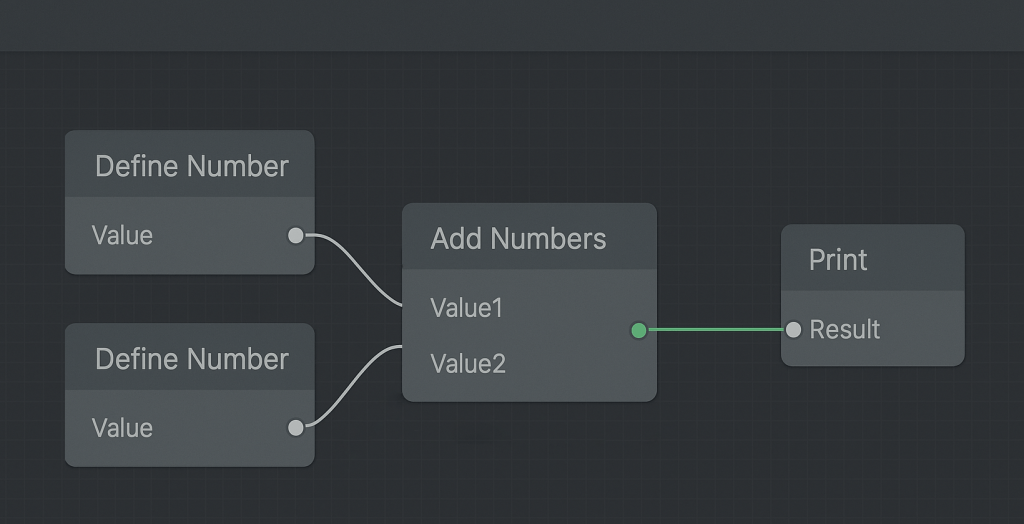
    Simple Divooka Program Diagram
    Simple Divooka Program

    To illustrate the simplicity of the language, we can write a minimal interpreter in Python.

    This interpreter handles an acyclic graph of nodes with TypeID, attributes (all strings), and connections between attributes. Connections are represented directly as attribute values: if an attribute value starts with @, it refers to another node’s attribute (e.g., @Node1.Value).

    For example:

    • DefineNumber outputs a number in its Value attribute.
    • AddNumbers takes two numbers as inputs and produces a Result.
    • Print consumes the Result and prints it.

    The interpreter maps node types to operators, executes them, and produces results.

    # minimal_graph_interpreter.py
    # A tiny, in-memory, non-cyclic node graph + interpreter.
    # Nodes have: Type, ID, attrs (all strings). Connections are '@NodeID.Attr'.
    
    from typing import Dict, Any, List, Callable, Optional, Tuple
    
    Node = Dict[str, Any]  # {"ID": str, "Type": str, "attrs": {str:str}, "state": {str:Any}}
    
    def is_ref(value: Any) -> bool:
        return isinstance(value, str) and value.startswith("@") and "." in value[1:]
    
    def parse_ref(ref: str) -> Tuple[str, str]:
        # "@NodeID.Attr" -> ("NodeID", "Attr")
        target = ref[1:]
        node_id, attr = target.split(".", 1)
        return node_id, attr
    
    def to_number(s: Any) -> Optional[float]:
        if isinstance(s, (int, float)):
            return float(s)
        if not isinstance(s, str):
            return None
        try:
            return float(int(s))
        except ValueError:
            try:
                return float(s)
            except ValueError:
                return None
    
    class Interpreter:
        def __init__(self, nodes: List[Node]):
            # normalize nodes and build index
            self.nodes: List[Node] = []
            self.by_id: Dict[str, Node] = {}
            for n in nodes:
                node = {"ID": n["ID"], "Type": n["Type"], "attrs": dict(n.get("attrs", {})), "state": {}}
                self.nodes.append(node)
                self.by_id[node["ID"]] = node
    
            # map Type -> evaluator
            self.ops: Dict[str, Callable[[Node], bool]] = {
                "DefineNumber": self.op_define_number,
                "AddNumbers": self.op_add_numbers,
                "Print": self.op_print,
            }
    
        # ---- helpers ----
        def get_attr_value(self, node_id: str, attr: str) -> Any:
            """Return the most 'evaluated' value for an attribute (state overrides attrs)."""
            node = self.by_id.get(node_id)
            if not node:
                return None
            if attr in node["state"]:
                return node["state"][attr]
            return node["attrs"].get(attr)
    
        def resolve(self, raw: Any) -> Any:
            """Dereference '@Node.Attr' chains once (graph is acyclic so one hop is enough)."""
            if is_ref(raw):
                nid, a = parse_ref(raw)
                return self.get_attr_value(nid, a)
            return raw
    
        def all_resolved(self, values: List[Any]) -> bool:
            return all(not is_ref(v) and v is not None for v in values)
    
        # ---- operators ----
        def op_define_number(self, node: Node) -> bool:
            # Input: attrs["Value"] (string number). Output: state["Value"] (numeric)
            if "Value" in node["state"]:
                return False  # already done
            raw = node["attrs"].get("Value")
            val = self.resolve(raw)
            num = to_number(val)
            if num is None:
                return False  # can't parse yet
            node["state"]["Value"] = num
            return True
    
        def op_add_numbers(self, node: Node) -> bool:
            # Inputs: attrs["Value1"], attrs["Value2"] (can be @ refs). Output: state["Result"]
            if "Result" in node["state"]:
                return False
            v1 = to_number(self.resolve(node["attrs"].get("Value1")))
            v2 = to_number(self.resolve(node["attrs"].get("Value2")))
            if v1 is None or v2 is None:
                return False
            node["state"]["Result"] = v1 + v2
            return True
    
        def op_print(self, node: Node) -> bool:
            # Input: attrs["Result"] (@ ref). Side effect: print once. Also store state["Printed"]=True
            if node["state"].get("Printed"):
                return False
            r = self.resolve(node["attrs"].get("Result"))
            # Allow printing numbers or strings once the reference resolves
            if r is None or is_ref(r):
                return False
            print(r)
            node["state"]["Printed"] = True
            return True
    
        # ---- execution ----
        def step(self) -> bool:
            """Try to make progress by evaluating any node whose inputs are ready."""
            progressed = False
            for node in self.nodes:
                op = self.ops.get(node["Type"])
                if not op:
                    # Unknown node type: ignore
                    continue
                progressed = op(node) or progressed
            return progressed
    
        def run(self, max_iters: int = 100):
            """Iteratively evaluate until no changes (DAG assumed, so this stabilizes quickly)."""
            for _ in range(max_iters):
                if not self.step():
                    return
            raise RuntimeError("Exceeded max iterations (graph might be cyclic or ill-formed).")
    
    
    if __name__ == "__main__":
        # --- Example in-memory graph ---
        graph = [
            {"ID": "Node1", "Type": "DefineNumber", "attrs": {"Value": "3"}},
            {"ID": "Node2", "Type": "DefineNumber", "attrs": {"Value": "5"}},
            {
                "ID": "Adder",
                "Type": "AddNumbers",
                "attrs": {"Value1": "@Node1.Value", "Value2": "@Node2.Value"},
            },
            {"ID": "Printer", "Type": "Print", "attrs": {"Result": "@Adder.Result"}},
        ]
    
        interp = Interpreter(graph)
        interp.run()   # Should print: 8.0
    

    Running the example graph prints:

    8.0

    Summary

    The Divooka language demonstrates how a minimalist graph-based specification can serve as a foundation for both computation and orchestration.

    Key takeaways:

    • Node-Centric Abstraction: Everything is reduced to nodes with types, IDs, and attributes – uniform, extensible, and easy to interpret.
    • Simple Reference Mechanism: The @NodeID.Attr convention provides a straightforward but powerful way to connect attributes.
    • Separation of Concerns: Distinguishing between dataflow (acyclic, deterministic) and procedural (control flow, cyclic) contexts allows Divooka to cover both declarative and imperative styles.
    • Composable Operators: Even with just three operators (DefineNumberAddNumbersPrint), meaningful behaviors emerge.
    • Compact Interpreter Footprint: The entire interpreter is under 200 lines of Python, demonstrating the specification’s simplicity and rapid prototyping potential.

    One might ask why not use traditional graph connections. The answer is simplicity: defining connections as local attribute references reduces structure while keeping graphs clean. In dataflow, inputs typically come from a single source, while in procedural contexts, outputs are unique but inputs may be shared, so we can just reverse the syntax – making this lightweight approach intuitive and efficient.

    Reference

  • A General Service Configuration Scheme in Graphical Context

    Tags: Design, Visual Programming, Design Language, Configuration, Research
    Author: Charles Zhang
    Publication Date: 2025-05-13
    Target Audience: General User, Visual Programming Language Researcher
    Keywords: GUI, Good Design

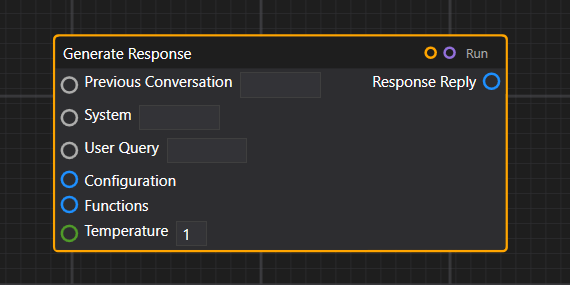
    In this article, we take a look at one emerging pattern that provides a straightforward and compact way to configure services. Generally speaking, when a function expects many inputs, the most straightforward way is to directly expose those on the node. However, this quickly makes the node gigantic in size.

    Node with many parameters

    (Node with many parameters)

    Example in ComfyUI

    (Example in ComfyUI)

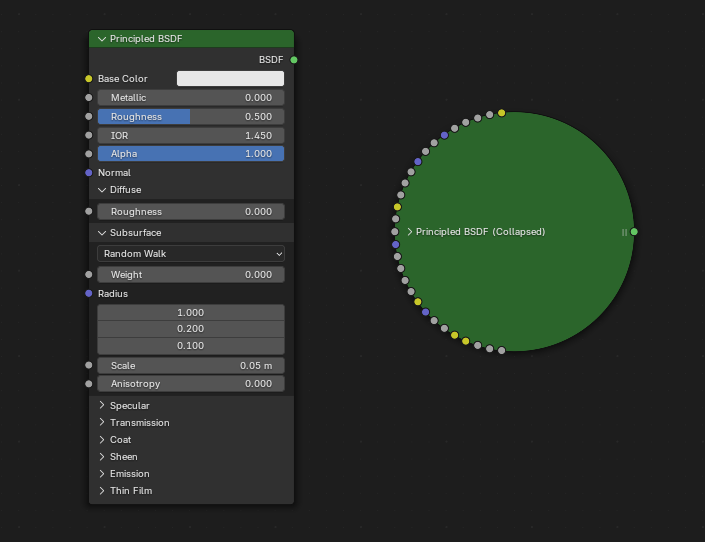
    When a node has too many parameters, it becomes bulky.

    Example in Blender

    (Example in Blender)

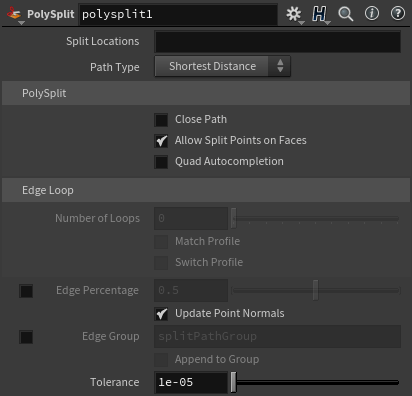
    This quickly becomes infeasible when even more complex parameters are required for the functioning of nodes—for instance, if it’s an online service with many potential configuration settings. A typical approach is thus to utilize a GUI element, which we shall call a “node properties panel.” Below is a sophisticated example from Houdini. PowerBI and Zapier do similar things.

    Houdini node configuration panel

    (Houdini node configuration panel)

    This method falls short for two reasons:

    1. It’s not explicit, and configuration parameters are not visible on the graph. Which makes it not possible to see dataflow nor to programmatically drive those values.

    2. It requires a dedicated GUI and can only be configured within that GUI.

    Usually, some kind of scripting or expression language is used to address the first problem. For instance, in Houdini, users often write VEX snippets or Python expressions inside parameter fields to control behavior dynamically. In Zapier, configuration can include custom JavaScript code or formulas in input fields to manipulate data between steps. These workarounds bring back some level of flexibility, but at the cost of breaking the visual flow and requiring users to write code inside otherwise “no-code” or “low-code” environments.

    One design goal of Divooka is to be frontend-agnostic. The currently released frontend is officially known as “Neo”, which is a WPF-based technology. However, Divooka graphs are designed to be generic enough to be visualized on different frontends—ideally in a way that’s very easy to implement. That’s why we prefer to expose everything explicitly, so no specialized logic is required on the frontend (e.g., to be aware of the nodes they are dealing with).

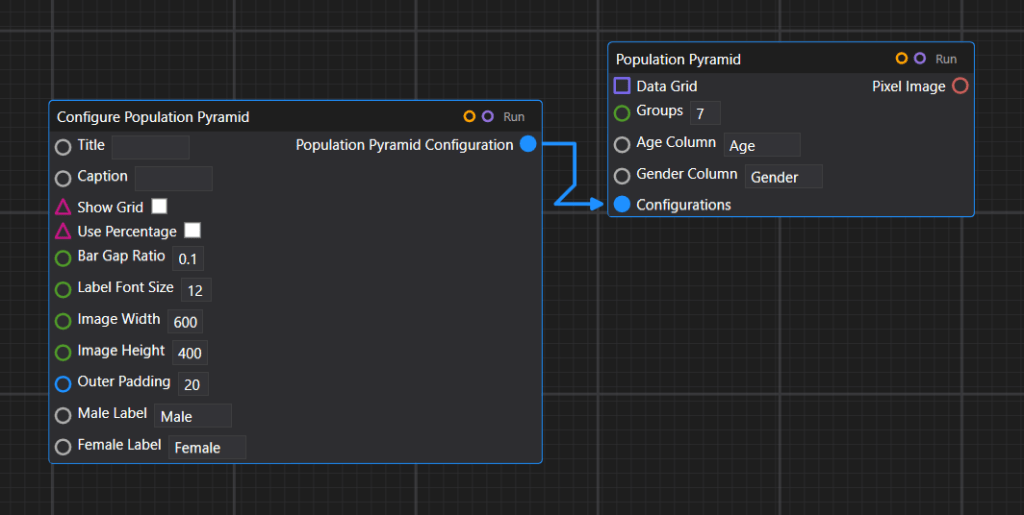
    Visually, we have a ConfigureX node and some nodes that take a configuration parameter as input. This dominant pattern is used in many places, including plotting configuration, OpenAI service configuration, and some other APIs like the image composition API.

    Example of plot configuration

    (Example of plot configuration)

    Example of OpenAI service configuration

    (Example of OpenAI service configuration)

    Example of image composition API

    (Example of image composition API)

    We could provide a few different overrides for creating a configuration—so depending on how many details are needed, one can use a more lightweight or more heavy-duty configure node.

    PostgreSQL with two different configurations

    (PostgreSQL with two different configurations)

    That concludes our introduction to the current setup, but the versatility of Divooka doesn’t end here. Indeed, we could also introduce some kind of GUI panels for advanced configurations, and in fact, that’s desirable for certain things – at the price of losing the capability to programmatically drive the parameter values. This will be an expected standard feature in the full release of Divooka.

    References

    This article reference the following software:

    • Houdini – A professional 3D animation and visual effects software used in film, TV, and games, known for its node-based procedural workflow.
    • Blender – A free and open-source 3D creation suite that supports modeling, animation, simulation, rendering, and more.
    • ComfyUI – A graphical node-based interface for building image generation workflows using AI models like Stable Diffusion.
    • PowerBI – A business analytics tool by Microsoft that lets users visualize data and share insights across an organization.
    • PostgreSQL – A powerful, open-source relational database system with a strong emphasis on extensibility and standards compliance.
    • Divooka – A general purpose programming language for building procedural programs and data flows through node graphs.
    • Zapier – An online automation platform that connects different apps and services to automate workflows without coding.
  • Launch of Methodox Blog

    We will be using WordPress for official blogs, guides and everything Divooka while working on a better and more integrated Methodox website!

    Some additional locations in our content network:

    1. YouTube
    2. Medium
    3. Dev Community
    4. Itch.io

    Join our Discord!

  • The Power of Visual Programming in Education: Going Beyond the Basics with Divooka

    The Power of Visual Programming in Education: Going Beyond the Basics with Divooka

    Author: Charles Zhang
    Co-Author: ChatGPT
    Published Date: 2024-08-12
    Last Update: 2024-08-12 (Rev. 001)
    Tags: Introduction, Education

    Visual programming is like opening a door to the world of coding, especially for young learners. Instead of staring at lines of intimidating code, students get to play around with colorful blocks and connect the dots—literally. Tools like Scratch have made this approach super popular in classrooms, but what happens when students are ready to level up? That’s where Divooka, our visual programming platform at Methodox Technologies, Inc., comes in. It’s not just another beginner’s toy; it’s a powerful tool designed to grow with the learner, taking them from the basics to real-world coding.

    Visual Programming: A Fun Way to Start Coding

    Learning to code can feel like trying to learn a new language—there are rules, syntax, and lots of things that can go wrong. But visual programming makes it much more approachable. Instead of typing out code, students use blocks or nodes to build their programs. It’s like solving a puzzle, and who doesn’t love a good puzzle? This method makes complex ideas like loops and conditionals easy to grasp, making learning fun and interactive.

    Visual programming also encourages creativity. Since students can see what their code is doing in real-time, they’re more likely to experiment, explore, and learn from their mistakes. This hands-on experience is vital for developing problem-solving skills, which are at the heart of coding.

    Divooka: A Tool That Grows with You

    Scratch and other similar platforms are great for getting started, but what if you want to do more? That’s where Divooka steps in. It’s a visual programming platform designed to be more than just an entry-level tool—it’s something students can continue using as they advance.

    Works Everywhere, Anytime: Divooka isn’t limited to just one type of computer. Whether you’re on Windows, macOS, or Linux, Divooka’s GUI is ready to go. The drag-and-drop interface is easy to use but powerful enough to handle more complex tasks. It’s like having the best of both worlds—beginner-friendly, but with room to grow.

    Real Coding, Real Results: One of the coolest things about Divooka is that it’s not just about dragging and dropping blocks. As students get more comfortable, they can start integrating real programming languages like C# and Python. They can even create and share their own libraries. This makes Divooka more than just a learning tool; it’s a platform that can take students from their first steps in coding to building their own applications.

    Learn Anywhere: With Divooka’s SaaS Cloud Computation service, students aren’t tied to a single computer. They can access their projects online, work from anywhere, and even collaborate with friends. It’s a flexible learning experience that fits into their lives, making coding accessible and convenient.

    More Than Just a Toy

    Some people think of visual programming as something for kids—just a fun way to introduce them to coding. But Divooka is here to prove that it’s much more than that. It combines the ease of visual programming with the power of professional tools, giving students a platform that grows with them. It’s not just about learning the basics; it’s about mastering the skills needed to solve real-world problems and create amazing things.

    With Divooka, students start with the basics, but they’re not stuck there. As they build confidence, they can dive into more advanced projects, experiment with new features, and eventually transition into more traditional coding environments if they choose. It’s a tool that supports them every step of the way, from their first block to their first app.

    Wrapping Up

    Visual programming is a fantastic way to introduce young people to coding. It’s fun, engaging, and makes complex concepts easier to understand. But when students are ready to take things to the next level, they need a tool that can keep up. Divooka by Methodox Technologies, Inc. is that tool. It’s a visual programming platform that’s not just for beginners—it’s for anyone who wants to take their coding skills further. It’s a platform that starts with the basics but doesn’t stop there, offering a smooth path from learning to doing.

  • Unlocking the Power of Node-Based Interfaces for DSL Implementation

    Unlocking the Power of Node-Based Interfaces for DSL Implementation

    Author: Charles Zhang
    Co-Author: ChatGPT
    Published Date: 2024-08-03
    Last Update: 2024-08-03 (Rev. 001)
    Tags: Introduction, #Technical, Guide

    In the rapidly evolving landscape of software development, the need for adaptable and user-friendly programming tools has never been greater. One approach gaining traction is the use of highly extensible general-purpose visual programming platforms, particularly those utilizing node-based interfaces. These platforms offer a low-cost, low-overhead, and highly effective way to implement and use domain-specific languages (DSLs), making them a compelling choice for developers and businesses alike.

    Visual Programming Platforms: A Brief Overview

    Visual programming platforms allow users to create programs by manipulating elements graphically rather than by specifying them textually. This approach leverages a node-based interface, where nodes represent various functions, processes, or data inputs and outputs, and connections between them define the program’s flow. By dragging and connecting these nodes, users can build complex workflows and applications intuitively.

    Why Node-Based Interfaces Excel in DSL Implementation

    1. Intuitive and Accessible Design

    One of the primary advantages of node-based interfaces is their intuitiveness. Unlike traditional code, which can be dense and difficult to decipher, visual representations are more accessible, especially for those who may not have a deep programming background. This democratizes the development process, allowing a broader range of users to participate in creating and modifying DSLs.

    1. Enhanced Collaboration and Communication

    Visual programming platforms foster better communication among team members. The graphical nature of node-based interfaces makes it easier for stakeholders to understand and contribute to the development process. This clarity can lead to more effective collaboration, reducing the likelihood of miscommunication and ensuring that all team members are aligned with the project’s goals.

    1. Modularity and Reusability

    Node-based interfaces inherently promote modularity. Each node can represent a discrete function or process, which can be reused across different projects. This modular approach not only saves time and effort but also enhances the maintainability of the code. Developers can update or replace individual nodes without disrupting the entire system, leading to more efficient and sustainable development practices.

    1. Seamless Integration with APIs and Microservices

    The rise of microservices and API-driven architectures has transformed how software is developed and deployed. Node-based interfaces are particularly well-suited for these environments. APIs can be encapsulated within nodes, allowing developers to easily integrate and orchestrate various services. This approach simplifies the construction of complex workflows, as developers can visually map out how different services interact and exchange data.

    Case Study: Visual Programming in Business Functions

    Consider a scenario where a company needs to automate its business processes, such as order processing, inventory management, and customer support. Traditionally, this would require extensive coding and integration work, often involving multiple teams and considerable resources.

    With a visual programming platform, the company can create a custom DSL tailored to its specific needs. Nodes representing different business functions (e.g., “Check Inventory,” “Process Order,” “Send Confirmation Email”) can be connected to form a coherent workflow. As new requirements arise, additional nodes can be introduced or existing ones modified with minimal disruption.

    Low-Cost and Low-Overhead Solution

    Implementing DSLs using a visual programming platform is both cost-effective and resource-efficient. The reduced need for specialized programming skills lowers the barrier to entry, enabling organizations to leverage their existing workforce. Additionally, the modular nature of node-based interfaces minimizes the overhead associated with maintaining and updating the codebase.

    Conclusion

    In the quest for more efficient and user-friendly development tools, highly extensible general-purpose visual programming platforms stand out as a powerful solution for implementing domain-specific languages. Their intuitive, modular, and visually engaging nature makes them an ideal choice for businesses and developers looking to streamline their workflows and enhance collaboration. As the software development landscape continues to evolve, the adoption of node-based interfaces for DSL implementation is likely to grow, offering a flexible and accessible path to innovation.

  • Subgraphs: Essential Building Blocks for Visual Programming Platforms

    Subgraphs: Essential Building Blocks for Visual Programming Platforms

    Author: Charles Zhang
    Co-Author: ChatGPT
    Published Date: 2024-08-01
    Last Update: 2024-08-01 (Rev. 001)
    Tags: Introduction, #Technical, Guide

    In the realm of visual programming, breaking down complex tasks into manageable components is key to creating effective and scalable solutions. One of the most powerful techniques to achieve this is through the use of subgraphs. By leveraging subgraphs, developers can abstract functionalities, streamline workflows, and enhance collaboration. In this article, we’ll explore the necessity of subgraphs in any useful visual programming platform and delve into two forms: document referencing and subgraphs within the current document.

    The Necessity of Subgraphs

    Visual programming platforms aim to make coding more intuitive by using graphical representations of logic and processes. However, as projects grow in complexity, managing and organizing these visual elements can become challenging. This is where subgraphs come into play. Subgraphs allow developers to:

    • Abstraction of Functionalities: By encapsulating complex logic into subgraphs, developers can create reusable components that simplify the main workflow.
    • Enhance Readability: Breaking down large graphs into smaller, more focused subgraphs makes the overall structure easier to understand and maintain.
    • Facilitate Collaboration: Subgraphs enable multiple team members to work on different parts of a project simultaneously, improving efficiency and collaboration.

    Two Forms of Subgraphs

    1. Document Referencing

    Document referencing involves defining functions and processes in separate files or documents. These referenced documents contain subgraphs that can be called and executed from the main graph. This approach offers several advantages:

    • Separation of Concerns: By isolating specific functionalities in separate documents, developers can focus on individual components without getting overwhelmed by the entire project.
    • Modularity: Document referencing promotes modularity, making it easier to update or replace individual components without affecting the rest of the project.
    • Scalability: Large projects can be broken down into smaller, manageable documents, allowing teams to work on different modules independently.

    Example: Imagine a project that involves data processing, user authentication, and report generation. Each of these tasks can be defined in separate documents. The main graph references these documents, ensuring that each module is developed and maintained independently.

    2. Subgraphs Within the Current Document

    Subgraphs within the current document involve defining sections of processes or subprocesses directly within the same file. This approach keeps everything self-contained, providing a conceptually clean and convenient structure:

    • Single-File Simplicity: Keeping all subgraphs within a single document ensures that the entire project is contained in one file, making it easier to share and manage.
    • Integrated Workflow: Subgraphs within the same document allow for seamless integration and interaction between different parts of the project.
    • Conceptual Clarity: Just like multiple worksheets in an Excel workbook, subgraphs within the same document provide a clear, organized view of different processes.

    Example: Consider an Excel workbook with multiple worksheets, each representing a different aspect of the same project. Similarly, a visual programming project can have a main graph with embedded subgraphs, each handling a specific part of the workflow, such as data input, processing, and output, all within the same file.

    Organizational and Collaborative Benefits

    From an organizational and management perspective, both forms of subgraphs offer unique advantages:

    • Document Referencing for Large Projects: When dealing with large, complex projects, separating documents is ideal. It allows different team members to work on separate modules simultaneously, ensuring a clear separation of concerns. This approach enhances collaboration and makes it easier to manage and scale the project.
    • Subgraphs Within a Single Document for Simplicity: For smaller projects or when a self-contained solution is preferred, keeping everything within a single document is more convenient. It provides a cohesive, integrated view of the entire project, making it easier to understand and manage.

    The Advantages of Divooka

    At Methodox Technologies, our Divooka platform is designed with these principles in mind. Divooka supports both forms of subgraphs, providing developers with the flexibility to choose the best approach for their projects:

    • Seamless Document Referencing: Divooka allows for easy referencing of external documents, promoting modularity and scalability in large projects.
    • Integrated Subgraphs: Our platform also supports subgraphs within the same document, offering a convenient and conceptually clean solution for smaller projects.

    By leveraging the power of subgraphs, Divooka empowers professionals to tackle complex tasks efficiently, enhance collaboration, and create scalable, maintainable solutions. Whether you’re working on a large, multi-module project or a simple, self-contained workflow, Divooka provides the tools you need to succeed.

    With Divooka, the future of visual programming is here. Embrace the power of subgraphs and unlock new possibilities in your projects. Are you ready to revolutionize the way you work and share?

    Copyright © 2024-2025 Methodox Technologies, Inc.

  • The Problem and Challenges with Sharing in Program Development and The Visual Paradigm

    The Problem and Challenges with Sharing in Program Development and The Visual Paradigm

    Author: Charles Zhang
    Co-Author: ChatGPT
    Published Date: 2024-08-01
    Last Update: 2024-08-01 (Rev. 001)
    Tags: Introduction, #Technical, Guide

    In the ever-evolving landscape of software development, sharing code and collaborative problem-solving are fundamental to innovation. However, the realm of visual programming and low-code platforms faces unique challenges that hinder efficient sharing and distribution. As we embark on a journey to revolutionize productivity with Methodox Technologies’ Divooka platform, let’s delve into the problem and explore the critical elements required to enable seamless sharing in visual programming.

    The High-Level Goals of Visual Programming Platforms

    Visual programming platforms are designed to democratize programming, making it accessible to everyone, regardless of their technical background. The primary goals include:

    • Enhanced Productivity: By providing an intuitive, visual interface, users can focus on solving problems rather than getting bogged down by complex syntax.
    • Rapid Iteration: Visual programming enables quick experimentation and iteration, fostering creativity and innovation.
    • Collaboration: These platforms aim to facilitate teamwork, allowing multiple users to work on projects simultaneously and share their solutions effortlessly.

    Despite these lofty goals, achieving true versatility and ease of sharing in visual programming is fraught with challenges.

    Practical Requirements for Effective Sharing

    To understand the hurdles in sharing within visual programming, we must consider the practical requirements:

    • Low Technology Tie: Solutions should not be heavily reliant on specific platforms or technologies, enabling users to share and use them across different environments.
    • Lightweight Dependencies: The dependencies required to run shared programs should be minimal, avoiding the need for complex setup or installation processes.
    • Accessibility: Solutions should be easily accessible to all users, regardless of their technical proficiency or access to specific tools.
    • Proper Abstraction and Encapsulation: Breaking down complex problems into smaller, manageable parts is crucial. This allows different team members to work on individual components independently, promoting efficiency and scalability. It’s also the key to reusability of workflows.

    The Technical Challenges of Sharing in Visual Programming

    Now, let’s dive into the technical intricacies that complicate sharing in the visual programming landscape:

    1. Platform Dependency

    Many existing low-code/no-code platforms lock users into their ecosystem. This creates a strong technical dependency, making it difficult to share solutions outside of the platform. Users often face challenges such as:

    • Proprietary Formats: Solutions built on one platform may not be compatible with others, hindering portability.
    • Limited Interoperability: Integrating with other tools or platforms can be cumbersome and time-consuming.

    2. Complex Dependencies

    Visual programming solutions can have intricate dependencies, including specific libraries, frameworks, or runtime environments. This complexity makes sharing and deploying solutions challenging, as users must ensure all dependencies are met. Common issues include:

    • Version Conflicts: Different users may have different versions of required dependencies, leading to compatibility issues.
    • Setup Overhead: Extensive setup processes deter users from sharing and using solutions.

    3. Accessibility Barriers

    Many low-code platforms require continuous online access, creating accessibility issues. Users in environments with limited or no internet access struggle to collaborate effectively. Additionally, the reliance on cloud-based solutions can raise concerns about:

    • Data Privacy: Users may be hesitant to share sensitive data through cloud platforms.
    • Service Reliability: Dependence on online services can lead to disruptions if the service experiences downtime or outages.

    4. Lack of Proper Abstraction and Encapsulation

    Traditional online web-based no-code/low-code platforms often emphasize real-time single-document collaboration. While useful for simple tasks, this approach is not scalable or efficient for tackling complex problems. Proper abstraction and encapsulation, principles from object-oriented programming, allow complex problems to be broken down into smaller, manageable parts. This segmentation enables different team members to work on individual components independently, leading to more efficient problem-solving and development processes.

    The Power of Simple, Shareable Solutions

    Consider the widespread popularity of tools like Microsoft Word, Excel, and Access. Their success can be attributed to a few key factors:

    • Single-File Simplicity: Documents, spreadsheets, and databases are self-contained in single files, making them easy to share and transfer.
    • Minimal Dependencies: These tools require no additional setup, allowing users to open and use files instantly.
    • Offline Access: Users can work on their files without requiring internet access, ensuring continuous productivity.

    The Advantages of Divooka

    At Methodox Technologies, we recognize these challenges and have designed Divooka to overcome them, creating a visual programming platform that truly enables efficient sharing and collaboration:

    • Cross-Platform Compatibility: Divooka solutions are designed to run seamlessly across different environments, reducing technology tie and enhancing portability.
    • Lightweight Dependencies: Our platform ensures minimal dependencies, making it easy to share and deploy solutions without extensive setup.
    • Offline Functionality: Divooka supports offline access, allowing users to work and share their solutions regardless of their internet connectivity.
    • Transparency in Dependencies: We provide clear visibility into the lower-level dependencies, ensuring users understand and can manage their solutions effectively.
    • Proper Abstraction and Encapsulation: Divooka promotes breaking down complex problems into smaller parts, allowing different team members to work on individual components independently. This approach enhances scalability and efficiency, making it easier to tackle complex projects.

    By addressing these core challenges, Divooka empowers professionals to collaborate effortlessly, iterate rapidly, and solve problems creatively. At Methodox Technologies, we’re not just creating software; we’re crafting a future where sharing solutions is seamless and innovation knows no bounds. Join us on this exciting journey and discover the possibilities with Divooka.

    With Divooka, the future of visual programming is here. Are you ready to revolutionize the way you work and share?

    Copyright © 2024-2025 Methodox Technologies, Inc.

  • How to Choose the Right Low-Code, No-Code, or Process Automation Platform

    How to Choose the Right Low-Code, No-Code, or Process Automation Platform

    Author: Charles Zhang
    Co-Author: ChatGPT
    Published Date: 2024-07-31
    Last Update: 2025-04-14 (Rev. 004)
    Tags: #Basic, Guide, Introduction, Low-Code, No-Code, Visual Programming

    In today’s fast-paced business environment, the demand for rapid development and automation has driven the rise of low-code, no-code, and process automation platforms. These tools empower users to create applications, automate workflows, and streamline processes without needing extensive coding knowledge. However, with numerous options available, choosing the right platform can be a daunting task. This article aims to guide you through the decision-making process, highlighting key factors to consider and introducing the distinct advantages of platforms like Divooka by Methodox Technologies, Inc.

    Beyond these considerations, it’s also important to note the emerging role of large language models (LLMs) and AI code generators in the development landscape. As natural language interfaces become increasingly sophisticated, they may, in many cases, substitute for no-code platforms that rely on pre-built templates and limited customization. When comparing solutions, be aware that while a no-code platform can kickstart a project quickly, it may also lock you into certain templates and restrict fine programmability — a limitation that is often circumvented with AI-driven code generation.

    Key Factors to Consider

    1. Scalability

    When choosing a platform, it’s essential to consider its ability to grow with your needs. A good platform should support everything from small projects to large, enterprise-level applications without compromising performance.

    2. Integration Capabilities

    Seamless integration with existing systems and tools is crucial. The platform should connect easily with other software and databases to ensure smooth data flow and process continuity. Ideally, such an integration process can happen gradually so as to avoid setup costs.

    3. Customization and Flexibility

    A versatile platform should allow extensive customization to meet your specific requirements. Look for tools that offer flexibility in design and functionality, enabling you to create tailored solutions. It’s also important to avoid vendor lock-in—avoid platforms that intentionally build strong dependencies and make it hard for migration.

    4. User-Friendliness

    The platform should provide an intuitive interface that is easy to learn and use, even for non-technical users. A user-friendly environment encourages trying and making mistakes, accelerates the development process, and produces more fruitful outcomes. It’s also important to check the platform has rich, abundant documentation and a vibrant online community so it’s easy to get help when stuck.

    5. Cross-Platform Compatibility

    Consider platforms that offer cross-platform compatibility, allowing you to develop and deploy applications across various operating systems and devices. This ensures broader accessibility for your team and future users.

    Addressing Common Pitfalls

    1. Avoiding Fragmentation

    Ensure the platform you choose offers a cohesive and integrated environment to avoid the common issue of fragmented systems where tools and components do not work seamlessly together.

    2. Managing Complexity

    Some platforms can become overly complex, making it difficult for users to manage and maintain their applications. Opt for solutions that balance functionality and simplicity.

    3. Avoiding Upfront Costs

    A good platform should support easy and gradual integration, aligning well with Agile methodologies and avoiding unnecessary commitments. This allows teams to adapt and expand their use of the platform incrementally, ensuring that it meets their evolving needs without overwhelming resources. Lightweight solutions are particularly beneficial, as they allow for flexible structuring suited to dynamic applications and reduce the need for extensive IT maintenance or support. This combination of gradual integration and low maintenance overhead makes it easier for organizations to adopt and scale the platform effectively.

    4. Considering the Advent of LLMs and Code Generators

    With AI-enabled code generators and large language models on the rise, organizations have more options than ever. While traditional no-code platforms can help create basic applications quickly, they often rely on rigid templates and limited customization. In contrast, LLMs can generate code directly from natural language prompts, providing greater flexibility and potentially reducing the long-term need for no-code interfaces. When assessing a platform, keep in mind how these emerging AI capabilities may impact your project’s longevity, customization needs, and total costs.

    Introducing Divooka Computing by Methodox Technologies

    Divooka stands out as a robust solution that addresses many of the challenges associated with low-code, no-code, and process automation platforms. Here’s how Divooka excels in the key areas:

    Scalability
    Divooka’s modular architecture and cloud capabilities ensure the platform can scale with your needs, whether for small tasks or large enterprise projects.

    Integration Capabilities
    Using standardized languages like C# and Python, Divooka integrates seamlessly with existing systems and tools, enhancing compatibility and reducing the need for custom connectors.

    Customization and Flexibility
    Divooka’s node-based interface allows for extensive customization, enabling users to easily create tailored solutions that precisely meet their requirements.

    User-Friendliness
    The intuitive flowchart-like, drag-and-drop interface of Divooka accelerates the development process and reduces the learning curve, making it accessible to both technical and non-technical users.

    Cross-Platform Compatibility
    Divooka offers cross-platform desktop applications that run seamlessly across various operating systems. Its web-enabled front-end provides cloud access, allowing users to work from anywhere with internet connectivity.

    Additional Advantages of Divooka

    Everyday Computational Needs
    Divooka isn’t just for workflow automation; it’s versatile enough for everyday computational tasks and ad-hoc analysis, making it a valuable tool for various applications.

    Local Machine Execution
    Built to run on local machines from day one, Divooka avoids complex infrastructure setup. It’s clean, portable, and free from the overhead of complicated setups.

    Minimal Overhead
    Divooka doesn’t add unnecessary complexity on top of C# and Python, making it easier to modify, integrate, and extend. This also means there’s no technology debt or migration hurdle since workflows closely match the underlying code.

    Permissive License
    Designed from the ground up to be highly manageable and (eventually) open source, Divooka offers transparency and control, giving users the confidence to adapt and extend the platform to suit their needs, while ensuring greater general accessibility without paying.

    Conclusion

    Choosing the right low-code, no-code, or process automation platform requires careful consideration of factors like scalability, integration capabilities, customization, user-friendliness, and cross-platform compatibility. It’s also important to factor in the rapid evolution of AI-driven development—though no-code platforms can be powerful and easy to use, LLMs and code generators may offer more fine-grained control.

    Divooka is a solution that excels in these aspects, providing a scalable, flexible, and user-friendly platform built on robust technologies like C# and Python. Its comprehensive features and seamless integration capabilities make it a strong contender in the realm of code-free solutions.

    By making an informed decision, you can harness the power of these platforms to drive innovation, streamline processes, and achieve your business goals more efficiently.

    Copyright © 2024-2025 Methodox Technologies, Inc.